Monday, September 25, 2006

WWWonderful Apache

The people who put together the Apache Web Server did a great job. Much better than Microsoft's IIS or Personal Web Server, which is just weird. Setting up Apache proved to be pretty easy, especially as my LAMP installation has done most of the work. The only mystery was to find where the files for the default web site should be stored.
Once again the Ubuntu Server Guide provided the clue: put them in the /var/www directory. That proved less simple than I thought, because I don't have the FTP server installed. So I added a Samba share and used the chmod command to change the directory rights. I have no idea how badly this would affect the security of a "real" web site, but this is just an internal test one, so I'm not really bothered. I guess I'll have to set up the FTP server at some point, only not now.
My next task is to set up MySQL and figure out how to install phpMyAdmin from the command line. This might be a bit more tricky. So far the documentation hasn't let me down, although I have a sneaking suspicion I'm not using vi properly. Ah, well, the joys of newbie ignorance.

Doing the Ubuntu Samba

I must say the Ubuntu Server Guide is a gold mine of useful starting tips. But they gloss over some important concepts and details in the process. I guess clarity has its price. I' not knocking the documentation: it is clear, concise and helpful. It can't be expected to know just how much of a Linux newbie I am.
My first hurdle was to install Samba after setting up the LAMP stack. Fortunately I have a working server to get information from. It's the Isogo firewall and VPN server. They set up for me a Samba share called "dev" as follows:
[global]
workgroup = MensClinic
netbios name = mcprog
server string = mcprog File Server
hosts allow = 192.10.200.0/24
dns proxy = no
security = share
[dev]
comment = dev shared folder
path = /devshare
guest ok = yes
writeable = yes
public = yes
browseable = yes
create mode = 0644
directory mode = 0755
I still don't know what a lot of this means, but it was a good starting point. My first hurdle was to create the "/devshare" folder with enough rights for me to save files to it in the shared folder. Fortunately I already knew about the chmod command, and I has worked with the vi editor before. So now it's all working correctly.
If I had followed the default netmask setting instead of trying to be clever the server name would have shown up in the local workgroup correctly as well. The documentation helped me fix that problem as well.
The next fun task was to set up the SSH server so I could connect and administer the server from my Acer laptop, instead of having to use my new Qwirky keyboard. Again the documentation was clear and helpful, and I had it up and running in a few minutes. It took me longer to find the newest version of PuTTY on the internet, which wasn't long.
So after a short time of installing the server and fiddling with the settings, I now have a server on the network with about 50GB of free space for storing files that can be shared on the LAN. The files aren't visible outside the LAN, and it works just like any other Windows shared directory.
Now I can see why Microsoft doesn't like the fact that Linux is a credible alternative to the old Netware or Windows NT file and print server.

Sunday, September 24, 2006

The Great Ubuntu Linux Adventure Begins

I'm not completely new to Linux. In 1996 when I worked at The Star newspaper, we had a Linux machine running the company mail server, and it was my job to maintain the mailboxes. So I got to create new users, change passwords, and modify some of the setup files using vi. I've never been afraid of the command prompt interface, and now that you can find out just about anything you want to on the internet concerning Linux, life is a lot easier, provided you are connected to the outside world.
Now that my ThinkPad G40 is back from repairs (they took 12 working days as expected, not the usual 96 hours) I simply can't trust it to be reliable any more. Two breakdowns in 2 years is not great for a machine that cost me R 20 000 to buy and another R 6 600 to replace at very short notice. So It has now been retired to my office to run as a LAMP server.
In case you haven't encounteed the term before, LAMP is an acronym for [L]inux, [A]pache, [M]ySQL and [P]HP. In my case I've also added Samba, so my server is a LAMPS server. My plan is to use Samba to make the spare space on the drive available for storing backup files and audio books. Then at a later stage I'll get MySQL working, and learn how to use it instead of Microsoft SQL Server for my database applications. The PHP and Apache combination will be used to administer the server and later perhaps I'll generate a web site to edit the data.
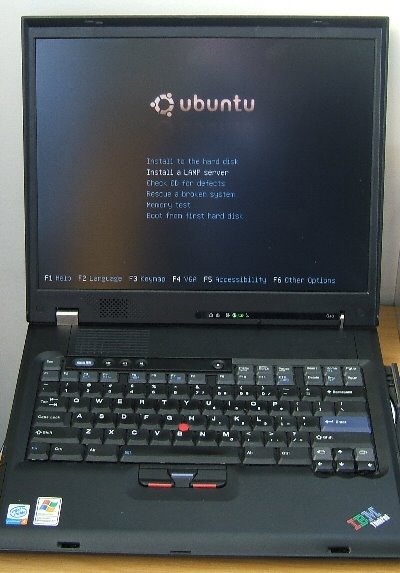
It's a whole new adventure and I've already got stuck twice. The first time I couldn't get out of the "man" program. Eventually I discovered you have to press "q". I tried Esc but that didn't work. The second time was figuring out how to install Samba, since it isn't part of the LAMP stack installation shown in the picture. Fortunately the Ubuntu Server Guide was easy to find, download and follow.

Friday, September 22, 2006

ThinkPad G40 gets a new keyboard design

Getting your laptop "fixed" by the IBM Technical Repair Centre is a two-edged sword. In my experience for every one thing they fix, they break something else.
The first time I took my ThinkPad G40 Type 2388-53G Serial number KM-97986 in for repairs it was because the hard drive died after 8 days of usage. They replaced the drive, but installed the wrong version (Home Edition) of Windows XP.
When they installed the correct version (Professional Edition) they also added some Gator.com spyware, and failed to test the motherboard or notice that the hard drive was running too hot. I guess they don't use Spinrite to test their hard drives. 18 months later the fan stopped working because of the motherboard fault. In the meantime the machine has been running too hot.
Now that the motherboard has been supposedly fixed (Call Ref 01S8DNT), the machine does seem to be cooling itself, but it still generates lots of heat in the process. However, the returned machine now sports only 1 rubber foot underneath, instead of the normal 4, and the snazzy new keyboard layout shown in the picture. I call it the Qwirky keyboard layout.
It's a good job I know where the right-arrow key is. Then there is the separate question of the 96 hour quotation time. In this case the repairs were completed in 12 working days, from 25th August to 13th September, but I was only able to collect it on 22nd September because of the conference.

Thursday, September 21, 2006

The Problem With Music

Ever wonder why bands hate the record companies? Ever wonder why the artists never complain about losing out on royalties but the RIAA always does? Ever wondered why bands are increasingly using the internet to distribute their music in order to get fans to come to their concerts? This article explains why. And the numbers speak for themselves.

So next time you buy a CD and think your favourite artist is getting a chunk of the money, think again. If they composed the words and the music, and produced the album, and played all the instruments, they'll get 4%. The rest goes to the record company, the distribution company, and 20% goes to the shop that sold the CD. And the cost of manufacture is typically 2%. Now you know why record companies don't like MP3 files. It's got nothing to do with the artists, and everything to do exploiting musicians to make money.

Tuesday, September 19, 2006

Digital Planet and the Newsletter from Hell

I like Digital Planet. At least, I used to. Their prices are good, and I've bought a laser printer, a power supply, Skype headsets and other goodies, both as gifts and for personal use. I always check their prices before looking anywhere else. I'll probably buy my next laptop from them as well.
But I hate getting their newsletters. Each time I buy something they put me back on their mailing list. Then I go into the account preferences and tell them I don't want newsletters. Then it's fine for a while, until I buy something else. Then the newsletters start again.
The last time this happened I complained, and explained the problem. That was on the 5th September. Last week I got another newsletter, so I sent an unsubscribe message over the weekend. Today I got yet another newsletter. When I spoke to someone who manages the mailing list, she recognised my name and email address, and tried to tell me that she got the email yesterday but hadn't processed it yet.
So what happened to the other emails? And when is Warren Moss going to call to explain what is going on? He is obviously a very busy man with little or no time to speak to actual customers. He has already lost out on the sale of an iPod Shuffle, which I will be buying from the helpful folks at iPodWorld instead.
Update: Since posting this blog I have been sent yet another newsletter. That's 3 newsletters in 1 week. How can anyone be expected to put up with all this junk?
Update 2: Warren Moss finally sent me an email saying that my name has been removed from their mailing list. let's see what happens next time I buy something.
Update 3: I placed an order 76744 on Thursday, but at that stage my account still had the "send me the newsletter" option ticked. See The Newletters from Hell continue unabated

Conference Sound

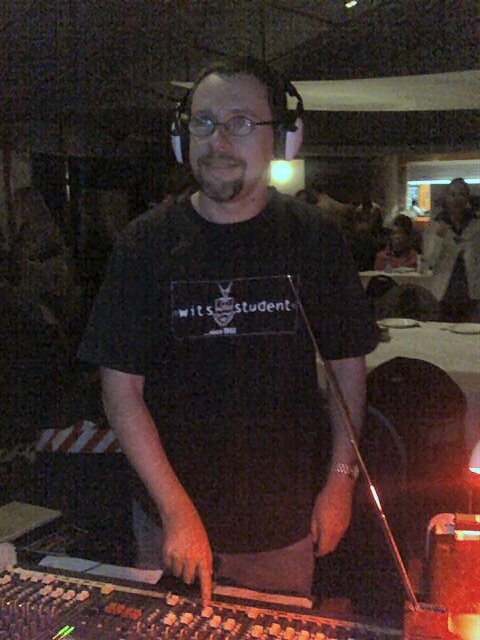
Andrew Christie took this photo of me doing sound at the Vineyard Conference last week. I really enjoyed it, and the guys in the worship team were awesome.

Safe XP aims to keep windows clean

Safe XP allows users to quickly tweak various security and privacy related settings in XP. The options include Media Player settings, Services settings (error reporting, time synch, remote registry etc.), as well as and option to remove items from the Start menu, network security settings and more. Safe XP improves your system performance and makes Windows to run faster, more secure and reliable, and is suitable for beginners and experts. It changes system settings, rather like PerfOptXP, and so you don't have to worry about another program running in the background using up resources.

More Safe XP information