Showing posts with label Hardware. Show all posts

Wednesday, July 27, 2011

My 330 Hour Hard Drive

I'm in the process of adding a 2TB hard drive to my home server, mainly for backups and archives. So before I format the drive I decided to run SpinRite in maintenance mode to check that the drive is OK.
You know you've bought a huge hard drive when you realise that SpinRite is going to take nearly two weeks (13.75 days) to test it thoroughly. I think I'm going to have to do the testing in stages, because I don't want to have the server offline for two weeks during testing. That's a bit extreme ;-)
Update: I ran SpinRite in "Emergency Recovery Mode" and it completed the job in around 5 hours. Now I'm formatting the drive, and I'm curious to see how long that takes. It also took around 5 hours to do a proper format of the drive. I have copied around 1TB of backup files onto the drive, and it took most of the weekend to do. 2TB is a lot of data!

Friday, September 03, 2010

Bye-bye HP, Hello Acer


Some time ago, shortly after the launch of Windows Vista, my wife Penny bought an HP Pavilion DV6204EU laptop, mainly because it looked nicer than the other laptops we saw. Pity it didn't work better. Now the thing has finally died: it won't connect to the network, or to the printer or scanner, and the CD/DVD drive hasn't worked for months.
So she finally agreed to let me replace her laptop, and yesterday we took delivery of a spiffy new Acer eMachines E725 laptop, with Windows 7, 4GB RAM, and a 320GiB hard drive. Now the fun begins, transferring all her old files and reinstalling all her programs. I hope the 64-bit OS doesn't cause too many hassles. At least the new machine can run Spinrite and report the HDD temperature.
I have bought 8 laptops in the last 5 years (4 were gifts, one was a replacement for a machine I spilled water on). Only the HP and an IBM ThinkPad have given us grief. Similarly, the HP printer still doesn't work properly on Windows Vista. As a result I will not willingly buy another HP product. Maybe they should revert back to their original name: Hewlett-Packup.

Friday, June 12, 2009

Israel Laptop Center shows how service is done

I wanted to arrange a laptop for our good friend Avi (shown centre) when she moved to Israel. Not only did we need to arrange and English/Hebrew keyboard (she does translations and Hebrew lessons) but we needed reliable installation and delivery to a town in Northern Israel. Of course the major retailers in South Africa were all completely clueless about Hebrew keyboards, especially for laptops, and the courier fees would have been hectic.
I made enquiries on various web sites, and received an extremely helpful and considerate answer from Judah at the Laptop Center. He recommended a Toshiba laptop because of its quality and guarantee period, and further offered to save us money by using the cheaper Office Home and Student edition.
At all stages they were polite, efficient and helpful, and the laptop has arrived at its destination safely. I wish there were businesses like this in South Africa. When asked they suggested how we could rent a 3G Broadband connection from IL Wireless Rentals, who offered to send the 3G modem to the Laptop Center to reduce courier fees. We eventually decided on a different approach, but I am impressed by the efficiency and helpfulness of both companies, and can heartily recommend them to anyone living in or travelling to Israel.

Wednesday, February 04, 2009

Hard Drive Temperature Is Critically Important

I learnt the hard way that an overheated hard drive is something to avoid: once the drive overheats it becomes permanently damaged, and loses data. Spinrite refuses to run when the drive gets too hot, because it's the quickest way of destroying data. So I use HDTune to monitor the temperature of my drive while I'm working.
This has already saved my drive a few times, because I can't always work in an airconditioned office. The other day I hit on a brainwave: instead of buying a USB-powered fan or notebook cooler, why not use a device found in most kitchens: a "Cake Cooling Tray"? I paid R39.00 (less than $4) from "@home, the homeware store" in our local shopping mall.
It measures 349mm x 235mm x 19mm and it fits easily into my laptop bag. It's silent, unobtrusive, and works like a charm. It costs a fraction of the price of a specialised fan (see photo above).

There is also hdTempLogger but I haven't tested it.

Friday, January 02, 2009

Fixing G31M-S Realtek Audio Problems on Windows XP

My Sahara "FRAGG" PC uses an ASRock G31M-S motherboard, which uses the Realtek ALC662 Audio Codec. The problem arises when you try to use Windows XP instead of Windows Vista, because the Windows XP driver doesn't seem to install properly.
Even after downloading the WinXP driver (WDM_R213.exe) from the Realtek site, it wouldn't install. Then I did a Google search for "realtek alc662 winxp" and found this HardForum post, which explains how to delete certain "HDAudio" registry keys. I tried it, rebooted as instructed, and was initially disappointed, not noticing that WinXP wasn't finished. After being asked to reboot again, it now works!

Thursday, January 01, 2009

Sabotaging Department Store Computers is Not Nice

Before Christmas I visited my local Game department store to buy a computer and a USB external hard drive. Because the computer was not properly labelled, and for other reasons, I only bought the hard drive.
I returned on Monday to see if the price tags had been fixed, only to find that someone had been fiddling with the machine. What they did was not nice, and clearly the store attendants have no idea how to fix it.
It isn't nice to go to the System Restore utility and restore the system back to a previous point. That effectively wipes out a whole load of carefully installed programs! Not good. In the old DOS days hackers used to type "format c:". At one computer show we renamed format.exe and copied siren.exe to the drive and called if format.exe instead. That caught a few perpetrators by surprise!
Another trick was to press Ctrl-Break on any machines running automatic demos, because the demo programs were usually written in BASIC and it stopped the demo dead in its tracks.
Today, demo machines should have the security locked down tight, or at least have screen savers with passwords on them, known only to the store staff. Alternatively, use Acronis TrueImage to restore the drive to a suitable image. But of course the technical expertise of a mass market department store is severely lacking. I guess PCs just aren't consumer items yet, and stores like Game can only compete on the basis of price.

Tuesday, November 11, 2008

HP's Vista Shortsightedness

When we bought our HP Laserjet 1020, Windows Vista was in its advanced Beta stage. Nonetheless, when Vista came out and we bought Penny's HP Laptop with Vista Home Basic preinstalled, the driver was not ready.
When the driver shipped in May last year, it was worse than the WinXP driver, putting black lines down the side of the page, on both WinXP and Vista. Needless to say I was not impressed. A year later the driver has not been updated.
Yesterday I went to buy a replacement toner cartridge, and noticed that the Samsung ML-1640 printer cost less than the toner cartridge. So not only has HP lost out on the sale of a R750 toner cartridge for the 1020, it has also lost out on the sale of a R12000 laptop (I didn't even look at HP/Compaq laptops last month) and once the 1020 finally conks out we will probably replace it with a Samsung or Lexmark colour printer.
All this because HP were too cheap to do a decent driver for the 1020. Not only does the Vista driver put lines down the side of the page whenever a graphic is printed, but the only way to print anything from another PC is to send it to the shared printer, and then reboot the host PC to get it to print. Not any more, since buying the ML-1640. HP knows how to annoy its customers, and it has done so really well.

Thursday, November 08, 2007

Time Magazine Gets Sucked Into Reality Distortion Field

I'm glad that Time's international editions managed to retain a little more perspective than the US Edition, but the hype about the iPhone is getting completely out of hand.
"The iPhone is more than just a gadget. It's a genuine handheld computer, the first device that really deserves the name." - Time Magazine
What kind of nonsense is this? It's no more of a computer than a Palm or Blackberry, or for that matter, my Nokia bottom-of-the-range phone. Or does the writer mean that because the phone can be hacked that it is now a "real" computer? No one needed to hack the others to install apps! Only on the iPhone - only from Apple. I guess Time fails this week's gullibility test.

Wednesday, February 28, 2007

Dear HP, where did my 80GB drive go?

Penny's new HP Pavilion notebook is beautiful. She loves the shiny finish, the DVD remote control, and the overall design of the notebook. But like many beautiful things, it has its trouble spots.
According to the advertised specifications, the unit has an 80GB drive.
According to Spinrite, the drive size is 80,026,361,856 bytes, which is only 74.53GB. An 80GB drive would be 85,899,345,920 bytes, since there are 1024MB in 1GB, and so on. So that means that 6.8% of my drive is vapourware!
To add insult to injury, the drive is partitioned into a "recovery" partition and a "working" partition, and the working partition is only 69.3GB. The other partition is for drivers and the Windows Vista install files, which I can't use because the backup software doesn't work.
So the advertised 80GB drive is effectively a 69.3GB drive. The missing 10.7GB is either "shrinkage" or badly configured. That's a loss of 13.3%! Thanks for that, Hewlett Packard!
Update: since posting this article on Digg, several readers have said that I was supplied with an 80GB (SI units) drive, not an 80GBi drive. How nice: as a consumer I am expected to "know" that when the specs say "up to 2GB" in the case of RAM they mean 2048MB, but when referring to hard drives they mean 2000MB. What nonsense!

Friday, February 16, 2007

The Laptop is in the Refrigerator

Penny's IBM ThinkPad R31 laptop has had a cooling problem for some time now because the motherboard is defective. Yesterday the hard drive developed a fault and the machine couldn't boot. Most likely the fault is because the drive runs too hot because the motherboard is faulty.
I booted the machine up with Spinrite, and after a minute or so it warned me that the drive was too hot. The only way I could run Spinrite's diagnostics was to put the entire laptop in the fridge. See photo. So far Spinrite has identified a part of the drive that is faulty, but I should be able to get around 98% of the data off the drive. If it wasn't for Spirite we would have lost most of it long ago.

Tuesday, February 13, 2007

Kettle TV is fun to watch


The first time I saw a transparent kettle I was fascinated, and have kept a lookout for one ever since. In December our local Pick 'n Pay added an amazing one to their store, and I couln't resist getting one, especially since our previous kettle stopped working.
This one has an automatic cut-off, and a "keep it warm" switch, so you can boil the kettle and keep the water hot until you're ready to use it. It's also got a removable base, making it easy to fill without having to unplug it from the wall.
The best part is watching it boil. The photo above doesn't do it justice, even if you click on it for a larger image. You can see the bubbles developing and then growing, and it's often more entertaining than the TV. That's why my kettle is now called "Kettle TV" because it fascinates our visitors too.
I also devised a simple way of getting rid of the "scale" buildup that happens inside the glass: vinegar. Just add some vinegar to the leftover hot water in the kettle, and in a minute or two the acid in the vinegar has dissolved all the alkaline scale from the inside. I use red vinegar so you don't inadvertently pour the vinegar mixture into a cup of tea.

Tuesday, October 17, 2006

The Super Cyclone Blower that Extracts

The first one I bought was Dead on Arrival, so I asked for a refund. Antec don't do refunds, so a replacement duly arrived and I collected it from Digital Planet on Monday.
I couldn't hear when they switched it on, because the room had a normal air conditioner. It's quiet. I think the Power Supply fan may be noisier, but it is certainly drowned out by the noise of the CPU fan. And in spit of the fact that it's described as a "Super Cyclone Blower" it doesn't blow air into the PC at all: it's an extractor fan, not a blower. And the picture is upside down.
The main point is that it extracts hot air from the server, and I can tell that the machine is running cooler, simply by the cooler air coming out of the PSU fan. So I guess a refund is no longer necessary.

Sunday, October 08, 2006

DVDs and the Law of Unintended Consequences

DVD iconsConsumers don't like to be ripped off. When is the movie industry going to realise this? Their greedy little minds are forever trying to come up with schemes to rip off the public and make more money, but in the end the consumer always finds a way to get even.
This weekend is a case in point. We rented a DVD from a respectable video store in the area. They are busy selling off all their old VHS videos because most people rent DVDs instead. We bought a few. We also hired a Shakespeare play, "Twelfth Night". It wouldn't play. Something about regional settings. Trust a Sony DVD player to come up with that nonsense. It's a good job I didn't buy the DVD player. I wouldn't buy a Sony one if you paid me to do so.
So when a friend popped round later in the day I asked him about this, and he mentioned a program called "DVD Shrink" that would allow me to copy the original movie onto a DVD-R, which would then work in the DVD player. I downloaded it and discovered that the movie in question was set for region 4 (Australia) instead of region 2 (Europe and South Africa). I clicked OK to accept the region setting, and then ripped the DVD.
Everything worked fine until I tried "Much Ado About Nothing", whereupon I was told that I needed to change my regional setting back to 2, and that I only had 3 changes left. What!? A quick look at the properties of my DVD hardware confirmed the bad news. Every time you change a region the hardware gets messed with.
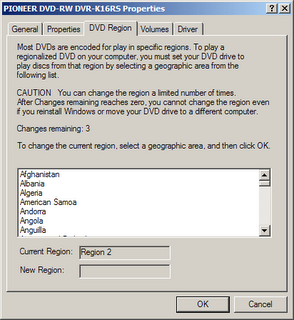
It's a good job that Microsoft had the good manners to let me know. I guess their programmers have been stung by this before. Anyway, I was now fed up that simply because someone sent the wrong zone DVD to our shop, I was damned if my hardware would get damaged in the process. A quick search of my hardware model led me to this site, which explains why DVD drives are defective by design.

I also tracked down "DVD Region Killer", a program that bypasses the problem, and "DiscInfo", a program that tells you the state of your DVD hardware.
So in order to protect my own hardware I am forced to bypass the manuafacturer's greedy DRM system. In the process I have been introduced to a cheap and effective way of copying rented DVDs. We tried recording a scene from "Chariots of Fire" from DVD to VHS tape for Penny's teaching prac, with disasterous results. Now we'll just copy the entire movie instead.
That's the Law of Unintended Consequences: They tried to stop me from renting pirate DVDs, and all they succeeded in doing was force me to find out how to copy legitimate ones instead. Here's another unintended consequence: by preventing people from taping DVDs onto VHS, they supposedly encouraged consumers to buy DVD players and buy DVD copies of movies they already own. The people who spent the most money in this way were, of course, the video rental shops. Now they are having to sell off their old VHS tapes because consumers want to rent the DVD instead. The movie companies are screwing their own distribution chain. Once consumers find how simple and easy it is to keep a copy of the rented DVD, they may stop buying fake DVDs from the people who sell them at the traffic lights. Was that the intended consequence? I doubt it.
If you are a movie industry lawyer reading this, consider the following before you sue me: I have already paid royalties to your company by purchasing the DVD drive in my laptop. It was nice of you to pass on 0% of this royalty to your artists. Secondly, I have paid another royalty when I bought the blank DVR-R disc, even though most of the discs are used for data backups. Again, 0% goes to the artists. Thirdly, I will have paid a third royalty when I rent the DVD from the video shop. Thank you for passing on a 1% royalty to the artists. You are most generous.

Friday, October 06, 2006

Keep your cool while using your notebook

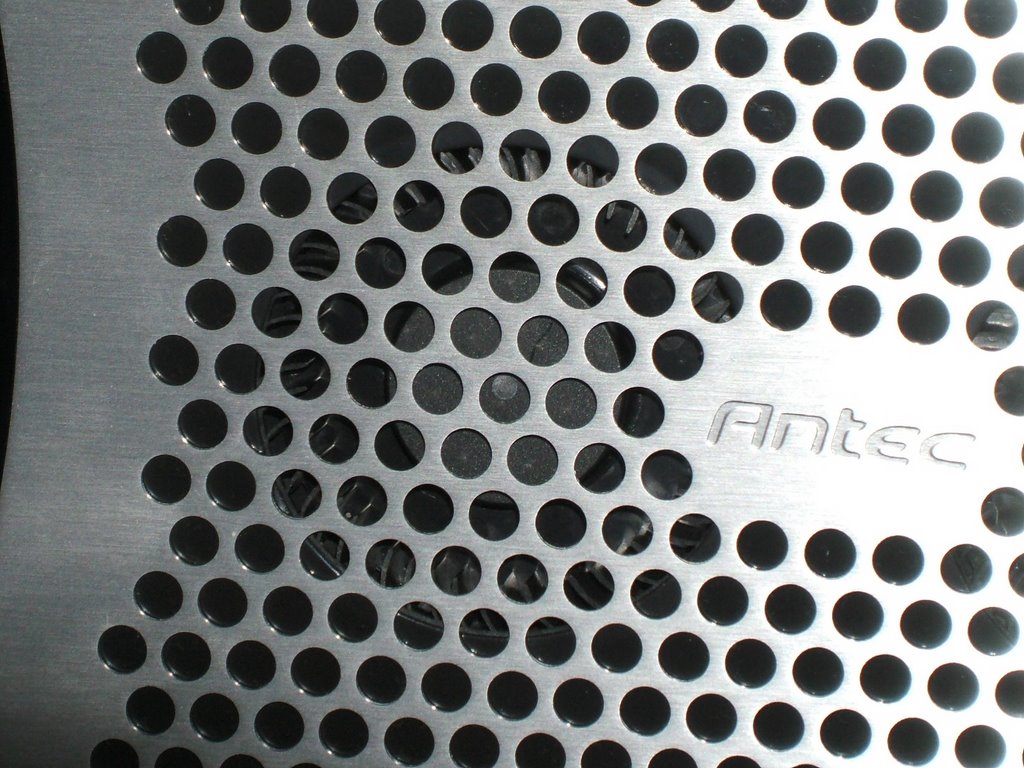
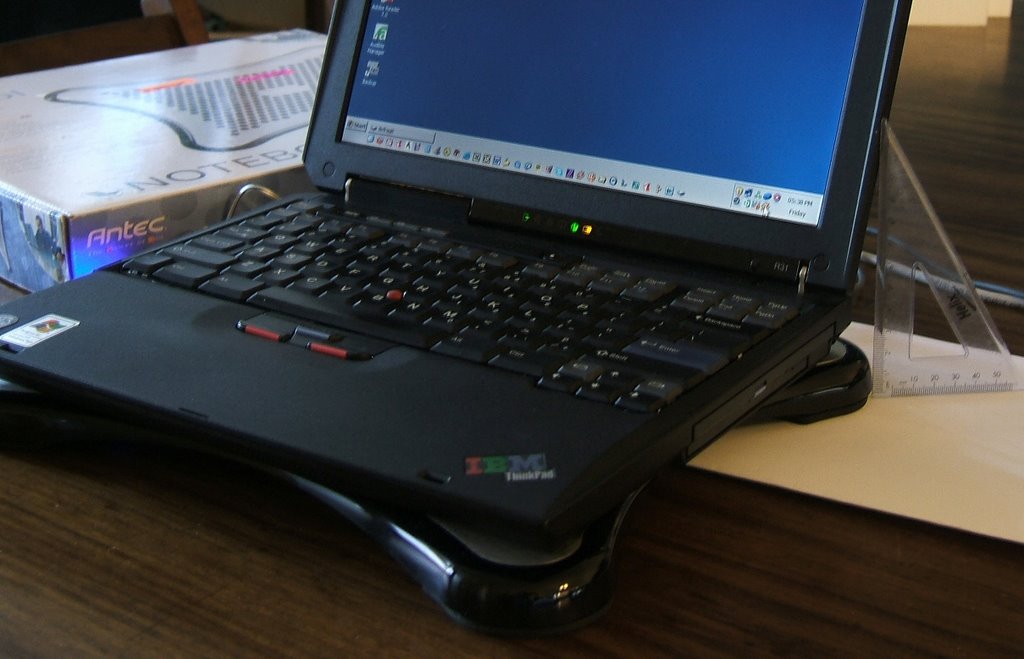
After my disaster with the "blower" that sucks, I bought the Antec Notebook Cooler. My laptop is now an extra 2cm above the ground, with the cooler underneath. It uses two cyclone fans to draw air from the underside of the laptop and extract it to the back and the right. The photo shows the top part. The two darker circles are where the fans extract the air and eject it out of the sides. Basicaly this turns the bottom of your notebook into a cooling area. I may need to modify it a bit to get it to keep Penny's ThinkPad R31 sufficiently cool, since its fan has stopped working reliably and the hard drive overheats when you run Spinrite.
The power is obtained from a USB connection, and they thoughtfully allow the USB connection to daisy-chain with another device, so Penny can still use her USB mouse and the cooler fan. The photo* abve shows the power cable plugging in to the USB connector on the left.
This photo* shows a close-up of one of the two fans.
This photo* shows the ThinkPad R31 on top of the Notebook Cooler. As you can see from the ruler on the right, the keyboard sits about 4-5cm above the desk.


* Click for a more detailed image.