
You can find a
review of the $39.99
PerfectDisk 8 program (PD8), as well as the benchmark
results obtained. I was disappointed that the times were not faster than WDD, and somewhat bewildered. PD8 does a very thorough job, and can defrag drives that WDD is incapable of doing. I am at a loss to explain why the numbers are what they are, or why the times measured were so slow. My laptop never "feels" slow after using PD8, so these numbers seem to contradict my experience of using the product. Weird.
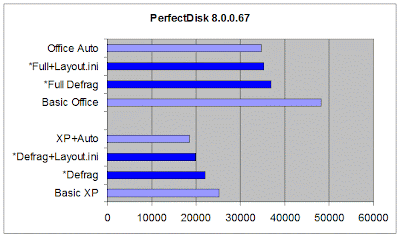
The graph shows
PerfectDisk 8 (PD8) in dark blue, and the results from
Windows XP in light blue. The first test is at the bottom, and shorter lines mean faster times.
- "Basic XP" refers to the standard install, without Office 2007, so there are only 710 files to be tested.
- "Defrag" refers to the read times of the same 710 files, after two defrag passes using the PD8 program, with no "Optimize Files" or "Optimize Boot" options enabled, allowing PD8 to manage the boot files itself (recommended). A 12% performance improvement is measured, not as good as the WDD result.
- "Defrag+Layout.ini" refers to the read time after enabling "Optimize Files" and "Optimize Boot" functions in Windows, and the Windows LAYOUT.INI option in PD8. An improvement of 20.9% is recorded, still slower than WDD.
- "XP+Auto" is the result obtained after enabling both "Optimize Files" and "Optimize Boot" functions in Windows, and then running WDD, i.e. the best that Windows XP can manage.
- "Basic Office" refers to the read time of all 802 test files, where no defragmentation has been done whatsoever, after the installation of Microsoft Office 2007 Professional (Trial).
- "Full Defrag" refers to the read time of all 802 test files after several reboots and two passes using the PD8 program, with no "Optimise Files" or "Optimize Boot" options enabled, using the "SMARTPlacement" defrag option, and allowing PD8 to manage the boot files itself (recommended). A 23.4% performance improvement has been measured, still 6.3% short of the "Office Auto" below.
- "Full+Layout.ini" refers to the read time after enabling "Optimize Files" and "Optimize Boot" functions in Windows, and the Windows LAYOUT.INI option in PD8. This performance improvement of 26.8% is still 1.6% slower than "Office Auto".
- "Office Auto" is the result obtained by allowing Windows XP to do its own defrag after enabling both "Optimize Files" and "Optimize Boot" functions.
The performance improvement ranges between 12% and 26%, with mixed results obtained when the built-in
Windows functions are employed; "Optimize Boot" is enabled by default. Still, an average 20.8% performance improvement over
no defrag at all is pretty good, better than DK2007's average and not far behind
Diskeeper 2008 Pro Premier, which is $60 more expensive.

Here is a picture of the drive before any defragmentation was done. Compare this with the top picture, which is the end result of the "Full Defrag" step. PD8's main strength is its ability to organise the files using its "SMARTPlacement" method.

Even though faster read times were obtained using both the "Optimize Files" and "Optimize Boot" options available in Windows, the "Optimize Files" option causes boot files to be moved away from the start of the disk, and is therefore not recommended.

Notice how the purple startup files are scattered around the disk if you choose the "Let Windows manage the layout.ini files" option. Over time this will get worse, not better, and the small performance gain at startup will be lost.
PD8's boot time defrag is highly effective at defragmenting critical system files and metadata, but it would seem that the "SMARTPlacement" method is not as effective at fast startup read times as some of the other methods available, even if it does manage to organise the files in an effective manner. Further tests will tell how PD8 and other defraggers fare with data files and prolonged use.
I have started testing
JkDefrag and will publish these results next.

 I have reviewed a previous version of UltimateDefrag 1.72, and posted the results of testing here. This has been the most complex of all the products to benchmark, because of the bewildering array of file placement options. The results show a representative cross-section of these options, using default values wherever possible. I have no explanation why the basic WDD results are faster, but these are still raw results.
 The graph shows UltimateDefrag 1.72 (UD) in dark blue, and the results from Windows XP in light blue. The first test is at the bottom, and shorter lines mean faster times. The magenta lines are the results obtained using each of the main file placement options.
 The image here is for the second "Volatility" option. Notice how the file placement is completely different to the "Auto" option at the top of the article.


 Then one of my largest customers had the SIM card for their GSM modem
  You may have noticed that all the "benchmark" results posted have an asterisk next to them. Why?


