Showing posts with label Windows. Show all posts

Monday, September 02, 2024

SSD Maintenance

Today I shared this advice with a programmer friend. I hope you find it useful. Firstly, you need to download and install HD Tune. Version 2.55 is still available for free (for personal use), but I use the pro version ($34.95) because it gives me extra features, and it saved my laptop hard drive on several occasions when it started overheating.
HDD
This is a typical hard drive benchmark, where the outside of the drive is faster than the inside.
SSD Before
This is my SSD drive. The blue line should be flat, since a solid-state drive has no moving parts. Notice the "dips" where the drive is having trouble reading the data. This is because the data signal has degraded through normal drive use.
DiskFresh
This is where you need DiskFresh by Puran Software (free). It will read and write all the disk sectors for you, eliminating the "dips" shown above. You don't want to run this too often on an SSD because writing does shorten the lifespan of the drive by 1 out of 10,000 writes.
Try not to run anything else while DiskFresh is busy. You will notice it slows down from time to time, either because the SSD is having difficulty reading your data, or because Windows is busy writing data to the disk.
SSD After
I ran DiskFresh on the first 40% of the drive, and this is the result: good performance over the whole drive once more.
If DiskFresh reports errors on the drive, then it’s time to bring out the heavy hitter: SpinRite 6.1, ($89) which requires support for a legacy (as opposed to "secure") boot. Not all modern PCs have legacy mode. This should be fixed in SpinRite 7 in a few years. SpinRite has various recovery modes. I suggest you run it on "Level 1" to get it to tell you what's wrong.

Friday, October 28, 2022

Clarion Resources and Products

SoftVelocity Clarion

This is an attempt to bring together the various useful Clarion resources, particularly those in Africa, since we have an Africa Clarion WhatsApp Group. Please contact me on WhatsApp if you want your Clarion-related website to be included in this list.

Clarion Accessories

  • Capesoft has produced a number of indispensable accessories for Clarion, including FM3, NetTalk, StringTheory and others. Link: CapeSoft Accessories for Clarion
  • ProperData has two accessories: Relational Browse, and Edit-on-the-spot. Link: ProperData
  • ClarionShop is the marketplace for all the accessories mentioned here, plus many others from around the world. All prices are in US$. Link: ClarionShop


Built with Clarion

  • CapeSoft develops Time & Attendance, Access Control, Job Costing, Panel Beating & Workshop Management, and Depreciation applications. Link: capesoft.com
  • Crommix provides software and services to Pharmacies, Medical Centres, Clinics and businesses in Burkina Faso. Link: crommix.com
  • Dr Smash Software provides packages focused on the Motor Industry and the requirements around Insurance and Manufacturer Approvals. With packages that range from Basic Quoting to Full Financial Business management, Dr Smash is your one stop shop for all your Motor Industry software requirements. Link: Dr Smash
  • SofTrends Solutions supplies Payroll, FAS Accounting, POS Inventory, Property Manager, HR Manager, Fleet Manager, Tours Manager, VetMed Manager, Insurance Brokers Manager, Hotel-Club Manager, and Bulk SMS. Custom software is the cornerstone of our business, based in Kenya. Link: SofTrends Solutions
  • Trident Software focuses on Managing and Rental Agent Software (townhouse complexes, homeowner associations, retirement homes, business parks etc.) Contact Ken Ward 083 235 5495 Link: Trident Software
  • WatchManager is used in the security industry to handle numerous incoming burglar alarm messages, and assist the control centre operators to follow the correct instructions for dealing with different types of emergencies. Link: WatchManager
  • WinFin develops accounting software for farmers and business in English and Afrikaans. Developed by Helgard Scholtz at ProperData. Link: WinFin


Worldwide Clarion Community: helping one another

  • Clarion Live has been running support and information webinars for many years. They have also published some free utilities for the community to use. They also host the Clarion International Developers Conference every few years. Links: ClarionLive, CIDC 2019, CIDC 2020/2, CIDC 2023 (Sept 11-15 2023, Orlando, Florida).
  • ClarionHub is the place to go to ask questions or share programming tips. Links: ClarionHub
  • NetTalk Central is the place to go to ask questions or share programming tips relating to the NetTalk ecosystem. Link: NetTalk Central
  • Clarion Mag archive has articles from 1999 to 2011. It's a gold mine of useful stuff. Link: clarionmag.jira.com
  • Clarion Blog is the official announcement page for SoftVelocity. Link: Clarion Blog
  • Principled Programming is a set of principles published by Daniel Read in 2001. Copy and paste this file in your main procedure to remind you of the principles. Article: developerdotstar.com
  • Skype Chats are available for a number of topics. This list comes from the ClarionHub forum. Link: Skype Chat Groups listing


Worldwide Clarion Accessories

  • SoftVelocity is the source for Clarion, plus several add-ons: In-Memory Driver, IP Driver, AnyScreen, Business Maths Library, Report Writer, etc. Link: store.softvelocity.com
  • Noyantis Software is a leading provider of Clarion Wrapper Templates. Each of our wrapper templates enables Clarion developers to quickly add powerful enhancements to their applications in a matter of minutes. Link: noyantis.com
  • LinderSoft is the home of SetupBuilder, a best-of-breed product for developers who want complete control over their software installations. Link: lindersoft.com
  • ohnOsoft products include Classify.It!, Analyze.It! and Update.It! . Link: ohnosoft.com
  • BoxSoft has created a number of Super Templates for use by Clarion developers. They have several vertical market products written in Clarion. Link: boxsoft.net
  • IceTips has Templates, Tools and Utilities for Clarion Developers. Link: icetips.com
  • CHT is short for Clarion Handy Tools, a wide variety of templates, classes, utilities, apps and projects. Link: cwhandy.ca
  • Mitten Software: Clarion Tools, Templates and Programming. Link: Mitten Software
  • Developer Team has numerous useful templates, plus a facility for sending WhatsApp messages. Link: developerteam.com.ar
  • Templates Clarion has some useful templates and products from Clarioneros in Argentina. Link: templatesclarion.com
  • Laro Group is also based in Argentina, and have developed numerous templates. clariontemplates.com
  • Upper Park Solutions is best known for their Version Control systems, but they also provide other Clarion services. Link: upperparksolutions.com
  • Ingasoft Plus aims to make your life easy, with templates and tools. Link: ingasoftplus.com
  • KlariSoft develops for Clarion programmers, ranging from simple utility templates to class/template wrappers of various third-party software. Link: klarisoft.com
  • Clarion ProSeries are serious tools for Clarion developers. Link: clarionproseries.com
  • Sterling Data supplies free and paid Clarion templates, a Clarion blog with articles of interest to Clarion developers and also provides Clarion programming services to assist Clarion developers. Link: sterlingdata.com


Worldwide Open Source Resources

  • GitHub topics listed on Github. Clarion.Studio has foked and collected 109 repositories as well. Links: github.com and Clarion.Studio
  • Clarion Community Help is a wiki community project to keep the help for the Clarion up to date with additional notes and helpful pointers. Link: clarion.help
  • Clarion Standards is a document from Mitten Software that identifies good coding practice. It's a ZIP download.
  • Carl Barnes has posted a number of useful code, examples, tools, templates and utilities. Link: github.com. His "following list" has a lot of good stuff too.
  • Mike Duglas has contributed 54 repositories. Many are free, some are commercial. Link: github.com
  • Steve Parker collected a large number of useful tips, FAQs, articles and files. These have been archived on the IceTips website. Link for articles: icetips.com. Link for Downloads: icetips.com
  • ClarionLife.net is a (Russian language) portal for Clarion developers. Google Translate will help. Link: ClarionLife.net
  • The History of Clarion is the (very unofficial) History of JPI, Clarion and SoftVelocity, by Paul Attryde. Link: pisoft.ru
  • Programming Objects in Clarion is an invaluable book by the late Russ Eggen. Link: github.com


My Clarion Lessons


These lists are a work in progress. Please send me any links you may have.

Sunday, February 21, 2021

Are Messaging Apps Really Private? I Doubt It. Here's Why

I used to believe that WhatsApp, Signal and Telegram offered "private" messaging, particularly end-to-end encryption. I no longer belive that, in spite of what they all say. With all the recent flurry of controversy surrounding WhatsApp, I installed Signal and took another look at Telegram. I belong to a number of WhatsApp groups, and a few Telegram groups. Each WhatsApp chat states:
"Messages and calls are end-to-end encrypted. No one outside of this chat, not even WhatsApp, can read or listen to them. Tap to learn more."
I used to take this at face value, but I don't believe it any more.
The first problem is what do they mean by end-to-end encryption? One would assume that each phone would create a direct link to the other phone, similar to the way Skype used to work. But that isn't the case. You can send a message to someone whose phone is switched off. The message can wait for days, if not weeks, before the other phone is switched on and the message is delivered. So the encrypted message is queued somewhere, presumably on the messaging app's servers, because the receiving party can receive the message even if the sending party's phone is off.
The second problem is the message backups. WhatsApp does a regular backup to my Google Drive, and they don't claim that it is encrypted. Nor do they claim that the messages sitting on my phone are encrypted. Confiscate my phone or log in to my Google Drive, and you get a pretty good idea what I have been reading and writing. Signal can make encrypted backups to my phone, and I have to copy that backup off the phone to make sure I don't lose all that data if the phone goes up in smoke or gets confiscated. Telegram automatically backs up all my messages to its "cloud servers", whatever that means. These are not encrypted. "Secret chats" are encrypted and not backed up.
The most obvious problem is this: each of these apps has a version you can run on your PC. So how does the PC get to display all the chats in plain, unecrypted text? No obvious information passes from the phone to the PC. If the phone stores a private key, the PC never asks for it. That means that either the server keeps a copy and passes it to the PC, or there is no private key on the phone. Therefore the server has the means to read the stored messages.
WhatsApp displays a barcode on the PC screen that the phone needs to read when you visit https://web.whatsapp.com. No information is passed from the phone to the PC. It all comes from the server. I have confirmed this by watching the traffic leaving my phone after connecting using WhatsApp Web. On the PC I navigated to a group that posts a picture price list every day, and was able to go back to October 2020, when the group first started. Every picture that I had opened on the phone was available on the PC, without the phone uploading the data when I requested it on the PC. It complained if I put the phone into flight mode, but the PC was able to read the messages anyway and the data was transferred from the phone's unencrypted store to the WhatsApp Web server. Hopefully it was sent using https, but WhatsApp doesn't say.
Telegram and Signal both send a confirmation message to the phone when you setup the desktop app. But nothing appears to go in the other direction. They don't complain if the phone is in flight mode. So when any of these apps talk about "end-to-end" encryption they don't mean that your phone (or PC) is one end and the person you are talking to is the other end. Nope. The other end is their server.
The implications of this are serious: your chat is "secure" in the way your internet banking is "secure": it uses https between your PC and its servers. Anyone trying to intercept the traffic between the user and the server is going to have a hard time decrypting it. For practical purposes we will say it's impossible. Even for the NSA and other (Big Brother) nation state agencies. It's encrypted, but it isn't private. Big difference.
If the government wants to read my messages, all it needs to do is get a court order and instruct WhatsApp/Signal/Telegram to enable their PC application for my phone number, without sending the confirmation message or barcode to my phone. Presumably this would be in read-only mode so they don't give the game away by typing in something by mistake, or showing that the message has been received and read when I haven't done that yet. But there is nothing on my phone that they need to read my messages. If there was, the PC app would need it too. It doesn't. So either the servers have a copy of my private key, or they don't need a copy because they don't use public-private key pairs.
Whatever the reason, it's not private, even if it is encrypted. Leave a comment if you think I missed something obvious.

Update 25th February 2021: From the WhatsApp white paper:
Defining End-to-End Encryption
WhatsApp defines end-to-end encryption as communications that remain encrypted from a device controlled by the sender to one controlled by the recipient, where no third parties, not even WhatsApp or our parent company Facebook, can access the content in between. A third party in this context means any organization that is not the sender or recipient user directly participating in the conversation.
From their "privacy page":
End-to-end encryption
Conversations in end-to-end encrypted chats are clearly labeled with a gold message; these messages and calls stay between you, and no one else can read or listen to its content, not even WhatsApp.
Messages are stored on your device
Your messages belong to you. That's why your messages are stored on your phone, and we don't share them with advertisers.
The messages are not only stored on my device: they can be displayed on a PC. They are backed up to Google Drive. If "and no one else can read or listen to its content, not even WhatsApp" then how does web.whatsapp.com display my decrypted content when I ask it to? My phone didn't suddenly become a web server. Did it decrypt the content and then send it unencrypted to their web server? Did it send my private key to their server so it could decrypt my content from its backup copy and display it? They don't say.
From the Whitepaper:
Client Registration
At registration time, a WhatsApp client transmits its public Identity Key, public Signed Pre Key (with its signature), and a batch of public One-Time Pre Keys to the server. The WhatsApp server stores these public keys associated with the user’s identifier.
Great. Public keys are supposed to be public. But in order to decrypt my messages you either need my private key or the private key of the reciptient. Which one does their web server or PC app use? They don't say.

Update 26th February 2021: I did some more careful measurements with WhatsApp Web. There is a discussion group I am part of that has 34MB of picture and file data, according to the app. During the time I displayed most of these images, after having cleared my browser cache, my mobile data usage went from 665.31MB to 671.56MB, a difference of 6.25MB. So presumably this data was sent by the phone app to the WhatsApp Web server, so it could be displayed in my browser. So I have deleted some of my original statements in the light of the new evidence.

Thursday, November 24, 2016

Windows 10 is ignoring my file associations

Microsoft just doesn't understand how annoying they are when they mess with my computer. I have put up with all kinds of weirdness with Windows 10, but thanks to Classic Shell and Spybot Anti Beacon I feel I am at least partially in control of my own PC. Until recently.
I started noticing some weirdness with my file associations. I've learnt to put up with the occasional file association reset that Windows Update does, trying to force me to use Edge to open PDF files instead of Acrobat. That's a well known and much hated "feature" of Windows 10. But this is different: it's a stubborn refusal to pay any attention to the fact that I don't want to edit text files with Notepad. I use EditPad Pro, and when I check in the registry it is correctly set up to use EditPad Pro. Except that the desktop ignores this completely. It seems that Windows Explorer (that's explorer.exe not Internet Explorer) is loaded is some weird mode when Windows 10 boots up. Any text file on the desktop will open in notepad. Any folder I navigate to from the desktop, such as via "This Computer" or via the "User's Files" icon is also affected.
I noticed an important exception: I have a batch file that opens my TrueCrypt drives and then runs the following command:
start explorer.exe X:\dev
which opens the X:\dev folder on the TrueCrypt drive. This version of Explorer gets the file associations correct every time. Some further experimenting has led me to a simple, but weird, workaround:
  • Allow Windows 10 to boot up and stabilize as normal.
  • Open the Windows Task Manager.
  • Scroll down the list of tasks until you get to the "Windows Processes" section.
  • Right Click on the one or two copies of Windows Explorer, and select "End Task".
  • Don't panic when the desktop disappears.
  • From the Task Manager go to the top menu, select File, then "Run new task".
  • Type in "explorer.exe" and make sure you tick the box that says "Create this task with administrative privileges"
  • Click OK.
You will get your desktop back and once it has settled down the file association problem will be gone until the next time you reboot the PC.
Like many workarounds I cannot explain why it works, only that it does. I don't know if it is something peculiar to my Windows setup, but I suspect not. If this helps you too, please leave a comment.

Update 3rd December 2016: After updating to version 1607 the problem seems to have gone away. I am cautiously optimistic.
The upgrade process turned into a bit of a mission, but after leaving the laptop to do its thing overnight I have a new version of Windows 10.

Friday, June 12, 2015

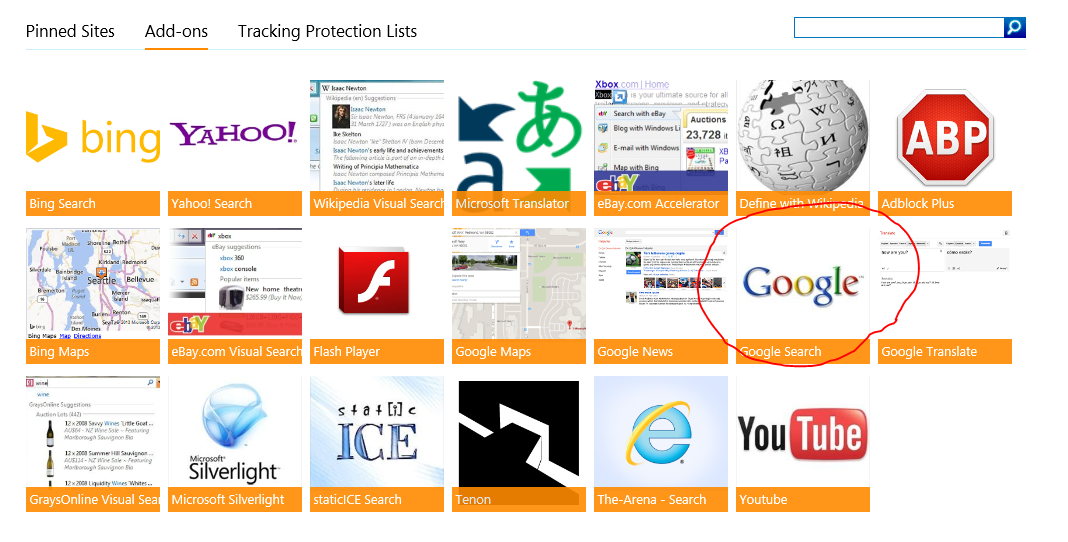
Microsoft Removes Google Search from Internet Explorer - Fixed

Last week I screwed up my Windows configuration on my laptop so badly I had to do a factory reset and reinstall everything from scratch. You'd think I would learn. Thanks very much to Steve Walker from SOS Support Operating Systems for rescuing all the critical data from my hard drive and saving me from losing over a week's worth of data that I hadn't backed up recently.
One thing I learnt in the process of doing the restore is that Microsoft no longer offers a Search add-in for Google. Only Bing and Yahoo search. I called their support line and had a weirdly bizzare conversation with someone who told me that if I want to use Google's search I need to install Google Chrome. Seriously?
Now I understand what the "99% Blocked" icon is all about: Microsoft blocks you from using the search tool that 99% of its users want to use. Anti-trust, anyone?
Update Saturday 20th June 2015: Thanks to Steven Quick for pointing out that the Google Search add-in is back. Thank goodness.

Monday, September 29, 2014

Carbonite's coloured dots stop working after installing Dropbox

Last night I spent a long time with a very helpful guy from Carbonite's chat service (a major improvement over what they had a few years ago) because I have just installed a new subscription of Carbonite on my new Lenovo Z50 Windows 8.1 laptop, and the coloured dots weren't showing. I had also noticed that some of the dots had stopped working on my old Windows Vista laptop.
It turns out the problem lies with DropBox. Or Microsoft. Or something. Dropbox has a whole bunch of overlay icons that it uses, and these tend to crowd out any other programs, like Google Drive or Carbonite. Frankly, I don't care about Dropbox's little icons, but I do rely on Carbonite's coloured dots to tell me what files still need to be backed up. So after uninstalling Dropbox and doing a reboot, the dot problem went away. But I need Dropbox and Carbonite.
I was reading a Dropbox helpdesk article "Why aren't my Dropbox icon overlays appearing correctly?" when I found the answer. There is a Windows registry key called "HKEY_LOCAL_MACHINE\SOFTWARE\Microsoft\Windows\ CurrentVersion\Explorer\ShellIconOverlayIdentifiers" that stores the details of programs wanting to use Shell Icon Overlays, the technical term for Carbonite's coloured dots. If you are technically minded and brave, exit from Dropbox, delete the 8 Dropbox entries in this registry key, and start Dropbox again. This fixes the problem, at least until Dropbox updates itself with a new version.
I'm not surprised that the Carbonite tech support people didn't suggest this, but I'm not entirely sure that "uninstall Dropbox" is good advice either. But if you don't mind fiddling with your registry keys, you may want to give it a try. It works on Windows Vista, Windows 7, Windows 8.1 and Windows Server 2012.

Friday, September 28, 2012

New Adobe Fonts for Programmers

Thanks to the Security Now podcast, I have discovered Adobe's two new open source free fonts, Source Sans Pro (above) and Source Code Pro (top). The are free for download at SourceForge: the links are below.
The Source Sans Pro font is designed for GUI applications, and Source Code Pro is for code editors like Visual Studio or EditPad Pro. I have changed my browser's default monospaced font to Source Code Pro as well, and it is much more legible that Courier New, especially when it comes to similar characters like I, i, 1, L and l; or O, o and 0. Hopefully I'll spot a few bugs this way. I plan to use them for a while, until they either annoy me completely or I stop noticing them, and miss them when I'm working on someone else's computer.
They are also available as web fonts using Google Fonts or TypeKit.com, so they can easily be incorporated into web sites.
Update Friday 5 Oct: After a week of fiddling with various font settings, I have decided that Source Code Pro 10pt is too small, and 11pt is too big, but not by much. So for my 50-year-old eyesight I'm sticking with 11pt for now.

Tuesday, June 26, 2012

Qualys Browser Check just got a whole lot more useful


Last year I heard about this really useful web site that checks your browser. It's at http://browsercheck.qualys.com/. It tells you what plugins are installed in your browser, and whether they are secure and up to date.
Now it has just become a whole lot more useful, because it checks all your browsers at once, even the ones you don't use, like
Internet Explorer. I have a server running Windows Web Server 2008 R2 and the version of IE that comes with it is basically useless, and I never use it. I use Google Chrome or Firefox instead, mainly for downloads. Recently I discovered that IE still had an insecure component of RealPlayer installed. It turns out this is the default configuration of Windows, so without a tool like this I would never have known.
Then there is the machine I use to develop the FishWise Pro web site. It has 5 different browsers installed, and keeping them up to date can be a problem. Not any more. The screen shot above shows me that they are all up to date, as well as all the main plugins, like Flash, Silverlight, Adobe Reader, and Java. Its very helpful.

Another related tool is the Update Checker from FileHippo.com. I run it from time to time to find out which applications need to be updated. It doesn't check every app I have, but it is pretty comprehensive and useful. If you haven't tried these utilities out, now is a good time.

Wednesday, July 20, 2011

Check Your Browser!

Many tech geeks know about how insecure Internet Explorer 6 is, and how even Microsoft has a web site dedicated to convincing users to upgrade. But is your browser up to date or vulnerable? One service that allows you to find out is the Browser Check from Qualys at http://browsercheck.qualys.com/ which can check most browsers, including IE (requires an add-in), Firefox and Chrome. Here is the result of running it in Firefox 5:
It's interesting that it reports the availability of version 5.0.1 even before the browser itself offers the upgrade. It also shows that (once again) Java is vulnerable, but no fix available yet.
When you run this check on Google Chrome you may need to load the "about:plugins" page to be able to disable plugins like the RealPlayer plugin, which you may not be using. I also found its false warning about a "potential threat" in Adobe Flash a bit annoying: it doesn't check the version number correctly. Hopefully this will be fixed before another flash vulnerability comes along. The bug doesn't happen if the plugin is installed.

Thursday, April 07, 2011

Time to get rid of Flash and Java

I have always regarded Flash, Acrobat, QuickTime and Java as "necessary evils" on my laptop, since I do a lot of browsing. But they are a pain to keep up to date, especially since they are full of security flaws.
But recently I realised that I only ever use Flash from within Google Chrome, and I'm not using Sun Java for anything now that LogMeIn doesn't require it any more. So I decided to remove both Flash and Java from my "Installed Programs" list, and rely entirely on the version of Flash that comes with Chrome. So far so good, since Chrome updates it automatically.
I wish I could do the same with Quicktime, but I still use iTunes from time to time. I have, however, disabled the RealPlayer add-ins on Chrome, Firefox and IE. That's more legacy software out of the way.
Another thing I noticed was that Google Chrome loads quickly but takes a long time to show all the thumbnails in its "New Tab" screen. So I changed it to show the "about:version" screen on startup instead. It's even quicker than before. And I have installed the NotScript extension to protect me from unwanted scripts, and AdBlock Plus to hide the ads. This had made my browser even better.
Hopefully Google will abandon their "flat" logo they are currently playing with in Chrome 12, because it looks terrible at small sizes, but we'll see. Both logos are shown here.