Showing posts with label P2P. Show all posts

Monday, October 26, 2009

Improve your P2P security

There are a number of reasons why you need to take extra security precautions when using Peer-to-peer (P2P) software. The most obvious is that you are having to trust a whole bunch of people you don't know and can't hold responsible if something goes wrong. Then there are all the P2P parasites, spammers, fake files and poisoners. It's a hacker's dream and a user's nightmare.
Why not P2P?
I'm not trying to sow fear, uncertainty and doubt: but this is a cautionary tale. Especially since many ISPs don't like P2P traffic because it uses up a lot of bandwidth (which we pay for) but they don't want to have to pay for. So they climb on the bandwagon and claim that P2P traffic is mostly illegal, when in fact what they really mean is that P2P traffic is mostly unprofitable. Some ISPs make it a violation of their Terms of Service to do P2P traffic of any kind, others just filter the traffic or interfere with it.
You can download malware or viruses on a P2P network like BitTorrent or eMule. I personally avoid downloading anything that looks like bootleg software, patches or installation CDs. If you can't download it legitimately from www.filehippo.com or from the manufacturer's web site, it's probably not worth using anyway. Most software I buy or test has a free trail period. The only exception I can think of is SpinRite, which has a no-questions-asked money back guarantee. There is also enough Open Source software out there that you can usually find something close to what you need anyway. So software on P2P is a security and quality risk: it's just not worth it, no matter how tempting it may be.
Many people use P2P networks to find music and movies. Again, you have no idea what kind of quality you are getting, and the bandwidth costs can be a factor. Downloading a compressed bootleg DVD can use up anything upwards of 700MB. Since I'm paying R99 per GB and I can rent most DVDs for R25, it just don't see the point. Also, many movie formats can include scripting and other security nasties, so you are taking your PCs health in your hands.
Music is less risky, and the music industry is finally beginning to understand that the sky won't fall in if they sell MP3 files or just give them away. I don't like stealing from the "artists" (actually its the record companies that are robbing them blind) but if I already own the record or cassette tape them I have no qualms about obtaining a digital copy of those songs, especially if they aren't available as an MP3 download.
Why use P2P?
I do have a problem with audio books. I spend over $50 per month on new audio books, but the book industry just doesn't have a clue about digital media, and they have tied themselves up in arcane contracts as badly as the movie industry. We bought all the Harry Potter books, but the digital downloads are still not for sale in South Africa. I can rent the CDs read by Stephen Fry, but not Jim Dale, and haved one so. But I also admit that I downloaded all the Jim Dale versions "illegally" via P2P networks like LimeWire and eMule. Some of the copies were dreadful, but I eventually managed to listen to the entire audiobook series, whether J K Rowlings' publishers like it or not. I bought the print versions, and I would have bought the audio versions on CD if they hadn't been 5 times the price, and if they had been available for purchase.
Again, there are economics involved. If the size of the book is greater than 1GB then its cheaper to buy a legal copy than download a bootleg one. I always try to find a legal copy anyway, because I'm not a leecher and am happy to pay for my hobby. Audible, Borders Audiobooks, Simply Audiobooks and AudioBooksForFree have all sold me books. The last 3 have sold more because they allow me to download MP3 files more often than not.
There are also legal stupidities involved. Diana Gabaldon's "Outlander" series now has 7 titles. You can buy books 1-4 and 7 in unabridged form, but I couldn't find books 5 and 6 for sale unabridged at all. Not even the CDs. But some kind soul on BitTorrent allowed me to download both. If I could pay for these copies I would prefer to. When the lawyers and the publishers decide not to boycott their customers, maybe I'll be able to.
Protect Yourself!
Aids activists all say you should use a condom. There are electronic equivalents for your computer: turn of uPnP on your router/modem, turn on your PC firewall, and use a good antivirus like NOD32. But that's just the beginning. I use a facility that block a whole load of bad web sites in my hosts file. It's called HostsMan and it cuts down on annoying ads and malware in browsers. But it can't block bad IP addresses.
For that you need PeerBlock, another free program. It monitors your P2P connections and makes sure you don't connect to any know bad IP addresses. You can get it to block HTTP traffic too, but it also stopped my NOD32 updates from downloading. This wasn't intentional, and I could fix it by using a different download server. Just weird.
eMule also has an IP blocking facility, but the standard ipfilter.dat file is only updated once a month or so, and doesn't stop the spam and fake files. You can update it more often using BlockList Manager, but it's a bit tricky to set up. It was originally designed to work with PeerGuardian, but PeerGuardian has been superseded by PeerBlock, which works well. I use both BlockList Manager and PeerBlock, to be sure, to be sure (Irish joke).
Beat ISP Filtering
My greedy ISP "blocks" all P2P traffic, usually during weekdays from 8am to 6pm. I'm not sure exactly how they do it, other than that eMule stops working properly and loses all its connections. So much for the "S" in ISP. The only way to get round this is to use a Virtual Private Network (VPN) service, such as ItsHidden. This sets up a secure tunnel between your PC and their servers, and the traffic between these two points cannot be analysed or decrypted, and looks just like any other VPN connection. It isn't illegal to use a VPN, and companies do it all the time. ItsHidden has a free VPN as well, so you can try it out and see how it works. Once you have used it for a while, you'll probably want to upgrade to their $9.99 per month paid service, which is faster and offers additional security features.
Their servers are in the Netherlands, so your PC appears to be operating from there. It's weird because when you do a Google search your default Google server is www.google.nl and the buttons are in Dutch. You can set your Google preferences to English quickly enough.
Don't confuse a VPN with a Proxy service. Proxies don't work the same way, and your ISP can still interfere with your traffic. A VPN effectively "relocates" your PC to another country. Its weird, but it works. The connection is a little slower than normal, but at least there is a connection.
Update 20 Sept 2011: I found a really reliable VPN service called SwissVPN that has been a great help. It can use the normal VPN software that comes with Windows, or you can use their OpenVPN client. Fortunately my ISP is being more reasonable with my traffic at present.

Sunday, March 25, 2007

Updated Freebie Software Page

Visitors to the Black and White Inc site have probably looked that the "freebies" page to see what is available for download.
I have just spent a productive Sunday morning updating the list of software that I have installed and use regularly on my PC. Here is the list:
  • 7Zip: (freeware) is largely better than WinZip in the variety of formats it can handle.
  • Access Opener: (myware)
  • Access Runtime Tester: (myware) The simplest way to repair and compact or decompile an .mdb file.
  • Ad-Aware SE Personal: (freeware) is largely obsolete because NOD32 does such a good job.
  • Adobe Acrobat Reader: (freeware) displays all the PDF files I use
  • allSnap: (freeware) keeps the screen from getting cluttered.
  • CCleaner: (freeware) keeps the hard drive from getting cluttered.
  • CmdHere Powertoy: (freeware) Useful for getting a command line where you need it.
  • Cool MP3 Splitter: (shareware) Useful for managing large MP3 files.
  • Contig: (freeware) from Sysinternals allows me to defragment an individual file from a batch file. Doesn't replace PerfectDisk, but helps keep the drive tidy.
  • DS Clock: (freeware) Those chimes are just so cool and you get to decide how the time displays on your desktop.
  • eMule: (freeware) with the XtremeMod extras. It's the best way of doing file sharing without all the spam and bogus files.
  • Goldwave: (shareware) is possibly the most useful audio editor available.
  • Google Desktop: (freeware) finds stuff fast, particularly in Outlook
  • Google Earth: (freeware) a great way to look at the world
  • Google Pack Screensaver: (freeware) allows me to view some of my photos when the PC isn't busy.
  • Google Toolbar: (freeware) indispensable for both IE7 and Firefox
  • Hamachi: (freeware) the simplest way to set up a secure VPN
  • Hunter-Killer: (myware) keeps the clutter to a dull roar.
  • Inno Setup: (freeware) incredibly useful setup program
  • ISTool: (freeware) the toolkit that makes Inno Setup so easy to use.
  • iTunes: (freeware) a necessary evil when using an iPod Shuffle.
  • Jasc Paint Shop Pro 8: (commercial) programmable and easy to use most of the time.
  • JGsoft Editpad Pro: (commercial) totally indispensable text editor.
  • LogMeIn: (freeware) great for connecting to remote machines.
  • Microsoft Access97: (commercial) my favourite database application, bugs and all.
  • Microsoft Developer Edition Tools: (commercial) used to make the runtime stuff. Inno Setup does a better job, but this licenses you to deploy Access runtime apps.
  • Microsoft Office XP Developer: (commercial) what a waste of a lot of money. I use Word and Excel, and have yet to write any AccessXP apps.
  • Microsoft SQL Server 2000: (commercial) comes with Office XP and allows me to test the SQL apps I write with Access97.
  • Microsoft Visual Basic 6.0 Professional: (commercial) I don't use it much, but it is still a great programming tool.
  • miFiles - My Internet Files: (freeware) a simple, effective FTP program. I love it.
  • Mozilla Firefox 1.5: (freeware) my browser of choice, especially with the following add-ins and extensions:
    • NoScript
    • Google Toolbar
    • Adblock
    • FasterFox
    • IETab
    • DownThemAll
    • ForecastFox
    • FoxClocks
    • PDF Download
    • Print Preview
    • Googlepedia

  • Mustang: (betaware) Mustang 4.x is the basis for the Miami applications I develop every day. No longer available.
  • MyMail: (myware)
  • NOD32 Antivirus: (commercial) keeps my PC virus-free and safe.
  • PerfectDisk: (commercial) keeps my hard drive in order
  • PerfOpt XP: (freeware) allows me to tweak some Windows settings
  • PKZip Command Line: (shareware) used with Zippy to make backups
  • Plaxo Toolbar for Outlook: (freeware) helps keep my contacts up to date
  • PsShutDown: (freeware) from Sysinternals allows me to shut down or Reboot from a batch file
  • Putty: (freeware) the Telnet client I use when I need to talk to my Ubuntu Linux server.
  • PrimoPDF: (freeware) is the best way to create PDF files.
  • Radmin Viewer 3.0: (commercial) indispensable for keeping client PCs organised and operational.
  • RealPlayer: (freeware) for playing Audible books
  • SafeXP: (freeware) tweaks Windows XP to make it a bit more bearable.
  • Search and Replace 2.87: (shareware) I bought this ages ago and its still a quick way to find and replace things across multiple files.
  • Skype: (freeware) great for long distance conversations
  • Snadboy's Revelation: (freeware) useful to test security and find lost passwords
  • SyncToy: (freeware) great for making backups
  • Total Recorder 6.0: (commercial) Standard Edition used to convert Audible books into MP3s and for recording Skype calls.
  • TrueCrypt: (freeware) keeps confidential data safe and secure, especially on laptops.
  • TweakUI: (freeware) helps control Windows.
  • UniBlue Registry Boster: (trialware) Compacts the registry, and supposedly finds registry errors. CCleaner works better. Not worth the money. Uninstalled and replaced with Auslogics Registry Defrag.
  • UniBlue SpeedUpMyPC: (trialware) removes miscellaneous files and allows me to monitor hard drive activity. The Memory Boost option is completely bogus. Not worth the money.
  • United Devices Agent: (freeware) Uses spare processor cycles for scientific work at grid.org
  • WavePad: (freeware/commercial) has a great Automatic Gain Control and is useful for converting audio books to my personal MP3 standard format: 32kbps, 22050Khz.
  • WinAmp: (freeware) plays most of the media files on my PC
  • WinZip 9: (shareware) the best ZIP file program, but I won't be spending more money for version 11. See 7Zip.
  • Zippy: (myware) makes backups of my work. Has saved me days of lost work over the years.
Digg it if you like it

Thursday, December 22, 2005

File Sharing Dangers

Can you spot the errors in this article? Do you think everything it says is true?

Introduction
So you have decided to join the ranks of other Internet users who share files. There is much for you to learn and understand. First understand there are many risks to what you are doing. Files you download from others can contain viruses and other nasty things. So be sure to have a good anti-virus application installed, certainly if you have a Windows-based system. Besides the risks of viruses and such, there are other risks, such as hackers and groups that monitor the internet. Understand that there are many unsafe ways to share files. Including but not limited to P2P, IRC, newsgroups and websites. There are also safe ways to share files as well.

For every connection to the internet there is assigned a unique number, called an IP address. There is no way to hide it, there is always a trail and plenty of ways to record and trace connections. There are methods of mucking up such trails and making it harder to match IP addresses. However they are usually very weak and offer little to no real protection from being traced.

Why share files?
An easy enough question to answer and understand. So that you can distributed and download content freely without paying money for it. Not that it is ever truly free, there is the cost of network bandwidth and system resources, along with the power and internet access costs. Also it can be for social reasons, such as to gain friends and access content you normally would not think to or could not easily get to otherwise. For such reasons file-sharing is very popular with millions worldwide engaging in it.

Scams
There are many bad people out there running scams, they offer access to networks and content, usually charging monthly or yearly rates for it. Granted there are legal services which do exist such as iTunes, eMusic and Audible. However there are also many scams, which upon being paid may give download access to a client, which a free and clean copy could be found elsewhere, usually at the original authors website. Such clients downloaded from the scam websites may be infected with viruses, dialers and other such nasty things. Nasty things like those with damage your system and misuse it, can even get you into trouble with the law. Such scams will lure people into unwittingly conducting content piracy, which they think is legal because they are paying for it. They will still get sued and can face time in jail, even if they were setup by a scam. Just because they were clueless does not make them safe. Anti piracy groups are usually totally heartless and courts usually will side with them if matters go that far, on the rare chance they cases make it to a jury trial, defendants are very likely to lose.

The Law
Beyond what was stated elsewhere in this FAQ, there is not much more to say. Just that understanding your local laws is a good thing if you intend to do any file-sharing. Also that regardless of any such understanding, it is not unusual to be burned by your court system, even if you did not commit a crime.

Set Up and/or Framed
So you think that you have been set up and/or framed. However wrong that may be, you should know often file-sharers are very weak and vulnerable. No matter what the circumstances that lead to you getting into trouble with the law, you are most likely to lose. Sure if you are wealthy and manage to get a very good lawyer who has a good understanding of the law, given enough time and money you can fight the charges, possibly even eventually win the case, though you must also understand you still end up losing in what you have had to spend on lawyer fees and time. File-sharers tend not to be wealthy, so there is not much need to any further along these lines.

Clients
There are many different file-sharing clients, which each offer different features and methods of networking users together. Most of which are unsafe and their users frequently tend to get into legal trouble for using them. Among the most dangerous are the P2P file-sharing clients, which usually allow direct insecure connections between file-sharers, all information concerning file-sharing is easily matched to IP addresses and file-sharers usually are left very open. A few such clients include but are not limited to LimeWire, BearShare, eMule, Morpheus, shareaza, directconnect and BitTorrent.

There are a few safe clients and methods for file-sharing, none of which connect to the internet directly. They go through overlay networks. Overlay networks are networks which exist on top of the internet. They use secure routed networking to route data between sources and destinations. They are general networks in that they are not designed specifically for file-sharing. Two such networks are tor and I2P. Tor is a very limited weak outproxy network that allows for simple web browsing and little else. So it doesn't do file-sharers much good to try abusing it. The other better developed network I2P, is more interesting and useful to file-sharers. Unlike tor it is robust and strong, but with extremely limited outproxying. Instead, members of the network have several safe options for sharing files, including serving them up on websites and with special file-sharing clients. Two such types of clients include certain Gnutella and BitTorrent clients, which have been modified to work on top of the I2P network. They offer safe file-sharing with decent speeds. Transfers and content shared using these modified clients are extremely hard to match to IP addresses, thus are safe enough for average file-sharing of most content.

Of course there are other far less safe but more lightweight and simple clients, which are safer than P2P clients. They use onion routing to make linking IP addresses to specific content hard. However they still link IP addresses directly to file-sharing, though not exposing which content the addresses were responsible for sharing.

Safety
So while sharing content through clients and networks, you should ask yourself is it safe for you to do so with the software and networking that you are using? Are you at risk and is it more than you are willing to handle?

Content and The Scene
There are many types of shared content, both legal and otherwise. Much of the more popular content is considered to be scene content. The scene is often considered as copyrighted music, movies, TV shows, software, warez and anyone sharing such content are usually tagged as pirates. Pirates which are caught, can and often are heavily fined, some may even end up spending time in jail, for the "crime" of illegal file-sharing. If you intend on sharing scene content, unsafe file-sharing is highly recommended against, it is highly risky and sooner or later you will be caught. While of course you are not encouraged to engage in illegal file-sharing by the author of this FAQ, laying out much of the facts the author knows concerning such matters is good for the FAQ's readers. For both law abiding file sharers and pirates alike.

Legal content, since illegal content was already briefly mentioned, next we will point out the less popular legal content, which should be safe to share no matter what methods and clients you use to do so. While sharing such content should be safe, it may not be allowed by your internet service provider and if certain methods are detected, some people have already lost their connections for using them. Worse more people in the future will likely also lose their connections over using file-sharing, even for use which is allowed by their local legal systems. So understand that using unsafe file-sharing can result in losing your internet connection, even if you were not breaking the law by doing so.

So just what is legal content? Legal content is the kind with licenses such as freeware, shareware, demos, trialware, public domain, GPL and LGPL. Homemade contents such as pictures, movies and personal documents are also considered legal, as long as they were originally shared by their authors and artists.

Security Measures
Some file-sharers resort to taking security measures in the hopes of protecting themselves. Such measures include but are not limited to certain client settings, filter applications such as peergaurdian, protowall, both of which use IP block lists to blacklist IP addresses which are suspected to belong to bad peers. Also content filters which block content that is supposed to be bad, either fake, infected by viruses or something along those lines.

Most such measures are limited and weak at least when it comes to the unsafe file-sharing clients and networking. Yet they can help reduce but not totally eliminate exposure to such peers and content.

I2P
Just to make some things clear concerning I2P. First it is not a file-sharing network and application. It is a general purpose network and application for freedom and privacy. No matter what is stated on the official website, forums and by developers, it is ready for large scale use, at the very least by people that are tech savvy. Which largely tends to fall into the age ranges of 30's and under.

That said, it is important to understand the risks of running it, the kind of networking and security it uses. However it is also important to realize that for the average internet user it is safe enough and provides more than enough security already to meet their needs. Just do not expect to use it as providing a haven for paedophiles and pedographic content, that the networks peers are very likely to gang up on anyone that does such things and attempt to turn your information over to the authorities. Note that the term attempt was used, because it is extremely hard to 100 percent prove a peer is the source for such content. Still the networks peers can certainly point authorities in the correct direction to a possible number of addresses they think the content provider may be from and for the authorities to start their investigation with. Though just know that peers are very unlikely to provide the authorities help against each other for other reasons. As many of them do not want to see the network become a haven for pedographic content and thus tarnish the network and projects reputation. So just know while it does help provide and protect a great amount of freedom, for the most part it is within reason. Not something which terrorists and paedophiles are welcomed to use, they should stick to abusing freenet as they have been doing.

Also there is much to I2P beyond the file-sharing clients that have been ported to it. There is real time chat, email, nntp news, websites, forums and other such common applications. Mostly 100 percent legal uses, which peers most commonly use the network for. So just because someone is running I2P does not mean they are likely using it for illegal or even questionable purposes. How much less likely, well nowhere near as likely as the P2P networks, certainly not anywhere close to as likely as freenet. So it should be legally safe to be a I2P peer at least in most areas of the world that have freedom and democracy. Such as America, Canada, Europe, Australia and Japan. As the network grows larger so will the peers safety.

Safety aside, as long as I2P's version is below 1.0 just know that there are bound to be things like bugs and a general lack of documentation, harder to configure and use, though that does not mean you cannot or should not use it. Just that it is still under heavy development and not to demand too much from it and it's developers just yet. If you are bright and willing to spend the time and effort in installing and configuring I2P and its clients, beyond that on a day to day basis it is very little if any time and effort to maintain and use. It is not yet something for the clueless unlike Kazaa and P2P clients are.

Related Sites
There are many such sites, too many to bother listing. A few such websites are
http://eff.org http://planetpeer.de http://www.slyck.com http://www.i2p.net

It is important to note, like everything which is on the internet, not all information found on a website is certain to be completely accurate and unbiased. For example slyck's forums have many posts which can be misleading, total lies and certainly biased towards P2P. You are advised against just taking much of what is on such forums as the complete truth.

The Future
No matter what the future may hold for file-sharing, such as new software and other technology. There is bound to be worse problems with shared content and bad peers, ligitious groups like the RIAA and MPAA, more file-sharers being sued and more. Sure there are safe options available now, which all file-sharers are highly recommended to use instead of the older unsafe options. You can be safe now if you take the time and put in the effort to be. Your own safety is your sole responsibility, you can ignore this FAQ's advice and continue to use unsafe file-sharing clients and networking, it is your choice to stay vulnerable or not.

The future of file-sharing is being built now, the software and networks which will become mainstream for the next five or more years are just being setup and adopted. The older type software and networks are already played out and degrading, even if they continue to grow with more new clueless users.

You do not have to join the ranks of the clueless, such as people who use Kazaa and other such vulnerable P2P. You can choose to show leadership and concern for other file-sharers well being, by adopting the safe software and networks now.


Also visit the File Sharing FAQ at DSL Reports. Download the above inaccurate information in a badly written FSFAQ as a PDF file.

Friday, December 16, 2005

Ed gets it wrong, again!

I got an email today from Ed, the guy who claims to have hacked my PC using a "security flaw" in LimeWire. This time he's all excited about a "worm" (actually it's a trojan) that spreads using P2P programs, in this case LimeWire.
The trojan is called Win32.Alcan.H and it poses as video.exe inside a ZIP file with the name of a porn movie. It also goes by the names of "W32.Alcra.D" or "Trojan-Dropper.Win32.WinAD.h". Yawn. There have been trojans like this around for as long as there have been P2P networks. A quick search on the Symantec virus encyclopedia lists 89 trojans that use LimeWire or related P2P networks.
Anyone who downloads an executable (in a ZIP file or not) and doesn't treat it with extreme suspicion is a fool. Even the LimeWire User Guide warns you about executables. And anyway, since when was a porn movie only 602,893 bytes long? There are plenty of bogus files out there, and the moral of the story is simple: if it seems too good to be true, it probably is. Anyone who thinks they can download Office 2000 in 200k deserves the trojan/advert they get.
It's sad that a company like Computer Associates can't tell the difference between a worm and a trojan, and it's sad that people like Ed don't read the virus alert properly anyway. But then Ed can't tell the difference between a security flaw and a product feature, or the difference between a "hidden" file and a non-existent one. But I guess when a "security consultant" like Ed plays fast and loose with the truth it's easy to lose perspective and fail to notice these details. Sad.
The only useful piece of information in the whole episode was the fact that the LimeWire sharing settings are stored in "limewire.props", a file stored in the
C:\Documents and Settings\user\.limewire
folder. Actually, I found a security issue there, which I have reported. No, Ed, it isn't a flaw, just a bad practice, and can't be used to hack anyone's machine.

Related pages: File not found; Flaw not found | Computer Assiciates "Worm" article | Go Ahead, Hack My LimeWire | Abort, Retry, Fail

Tuesday, December 06, 2005

Extreme File Sharing

Brian Krebs in his October 17, 2005 Washington Post Security Fix column writes:
"[I] spent a few hours over the weekend poking around Limewire, an online peer-to-peer file-sharing network where an estimated 2 million users share and swap MP3 files, movies, software titles and just about anything and everything else made up of ones and zeroes (including quite a few virus-infected files).
"I was sifting the lists not for music or movie files, but for the stuff Limewire users may not know they're sharing with the rest of the network. I quickly found what I was looking for, and then some: dozens of entries for tax and payroll records, medical records, bank statements, and what appeared to be company books.
"A search for "cookies" or "paypal," for example, turned up cookie files for a number of financial institutions. Having cookie files exposed might be a little less dangerous if you couldn't also click your way through every shared file on a user's machine. For the most part I found that users who shared sensitive information were also sharing the contents of their entire hard drives.
"Some users were sharing many megabytes' worth of e-mails and addresses from their Microsoft Outlook inboxes and archives. But perhaps most revealing was a search for "keylog.txt," which turned up several huge text files no doubt generated by a keystroke logger -- a nasty bit of malware that records everything a victim types and relays the data back to the attacker.
"At first, I felt a little weird looking at records of one apparent victim's private (and frequently explicit) online chat conversations from just a few months back. But I wanted to find some contact information in there so I could at least notify this person that their system had been compromised. I found an AIM instant message ID -- but alas, that screen name wasn't signed on. I even found what appeared to be the victim's cell phone number, but got a fast-busy signal upon dialing it.
"As I read on, however, it became clear that the victim at some point realized his machine was infected with some sort of virus, as evidenced by his IM complaints to a friend that his antivirus software had alerted him to something evil on his machine.
"Over the course of several days (the first 10 or so pages of the keylog record) it appears that the victim tried to repel whatever had invaded his computer. Apparently he failed, because not long after he seems to have stopped searching (or at least stopped complaining about it) -- even though the keylogger was clearly still doing its job.
"My guess is that this guy ran an antivirus or anti-spyware scan which found and deleted something, so he figured everything was back to normal.
"This reminds me of a concept that security professionals understand all too well: When a computer system is compromised by a virus or worm, the only way to truly clean it is to back up the data and reinstall the operating system, including any software patches issued since the computer was purchased. This can be a bitter pill to swallow for home users, many of whom have trouble understanding why someone would go through the trouble of trying to hack their system in the first place.
"None of this to say that antivirus tools and other security applications can't remove these intrusive programs on their own; often they do the job quite nicely. But many of today's more aggressive threats are designed to open the door for other intruders, which might not be so easily detected by security software.
"Obviously, the lessons here are: If you're going to use file-sharing networks, be extremely careful about what you download; and, pay close attention to the files and folders you are letting the rest of the world see."

It's a pity that well-considered opinions like this get drowned out by the chattering classes who don't understand security and get the story completely wrong, by mixing up the security risks of sharing files with non-existent security flaws.

By Brian Krebs | October 17, 2005; 03:40 PM ET

Monday, December 05, 2005

Credence: Thwarting P2P Pollution

"Much of the content in peer-to-peer filesharing networks is corrupt, damaged, or mislabeled. Such polluted content makes it difficult for correctly functioning peers to locate desired content, decreasing the overall usefulness of the network.
"Credence is a distributed object reputation management scheme that counteracts content pollution in peer-to-peer filesharing systems. Our system relies on honest peers judging the authenticity of online content, and allows clients to securely tabulate and manage object endorsements across the network. We employ a novel voter correlation scheme to weight the opinions of peers, which provides an incentive for peers to vote honestly and mitigates the impact of dishonest peers.
"Credence has been implemented on top of the LimeWire client for the Gnutella network. Our client provides a peer-based judgement that a given object will possess the properties with which it is labeled and enables users to evaluate search results for authenticity before downloading.
"Many peer-to-peer reputation schemes have been proposed in academia. Credence is the first practical implementation of a peer-to-peer reputation scheme. As future systems become more connected and endpoints become more reliant on content provided by other nodes, reputation systems like Credence can play an important role in assessing the validity of remote content.
"As of September 20, 2005, Credence has been downloaded more than 10,000 times. We are examining the emerging properties of the Credence network."

Original story at Credence: Thwarting P2P Pollution from Cornell University. At present it only works with LimwWire 4.8.1. Hopefully it can be included in the FrostWire project.

Sunday, December 04, 2005

File not found; Flaw not found

Edward L. Chiarini Jr. is losing the plot. So much for his security expertise. He claims to have infected my machine with files that cannot be found. The reason why they can't be found is that they really aren't there. He wants me to simply believe that LimeWire can accept "placed" files and can display them in Ed's copy of LimeWire, but not anyone else's, and that LimeWire can hide an uploaded file using rootkit technology, and execute an arbitrary .htm file remotely, just by downloading it. That's asking a bit much!

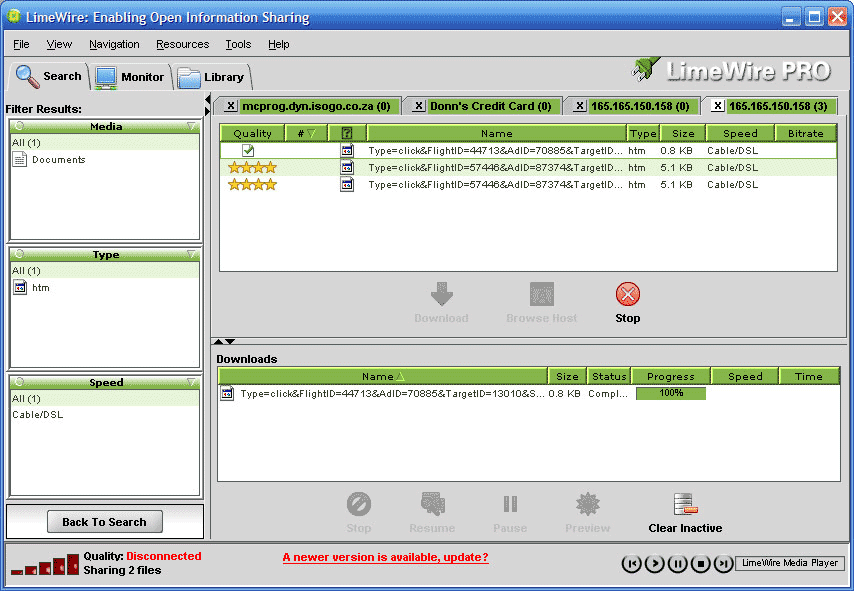
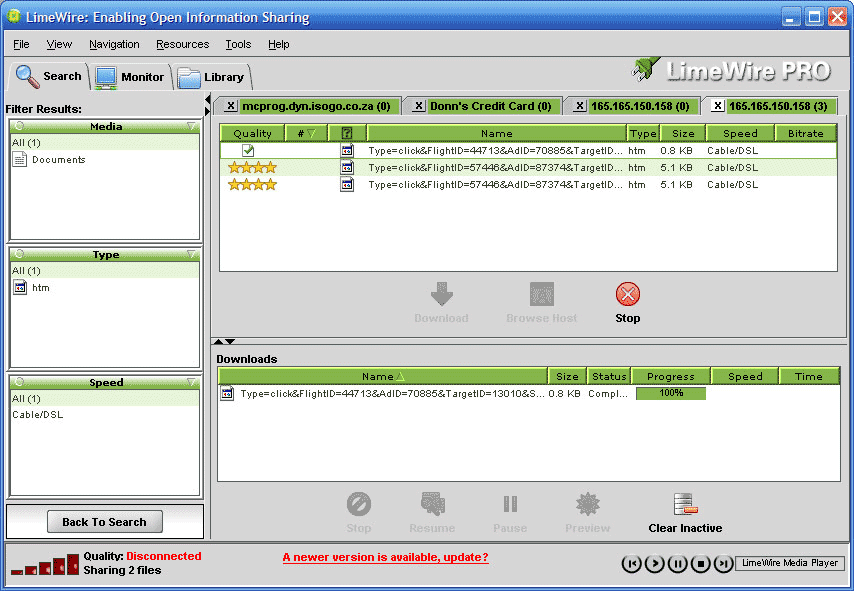
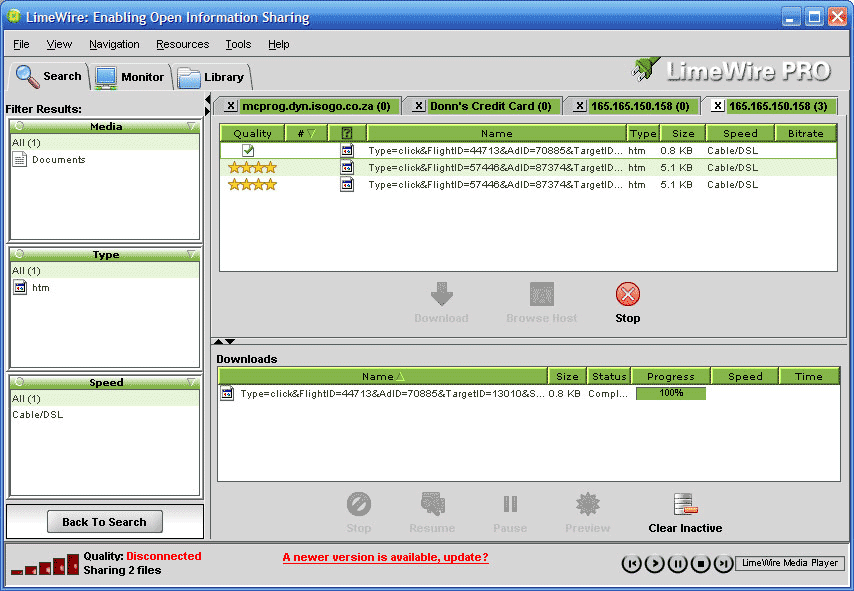
"I placed 1 file containg the virus (note size 0.8kb) then poked it, so it duplicated two more infected files (note size 5.1KB)

(Click on the image for more detail)

"If you cant see them is probably because their [sic] invisible. When I say invisible, it means not even if you turn on invisibles, or show system files settings in your options, will you see them either.

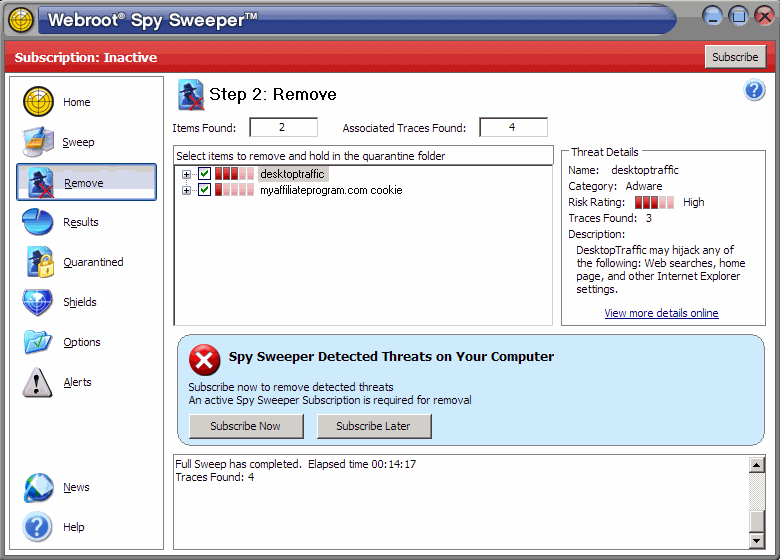
"Run uninstall whatever antivirus you have running, then install Mcafee via their web site. Run it, and eliminate the infections. Also install Webroot’s free 15day spysweeper and run it also. Uninstall them both if you want, then reinstall your old antivirus (if you want)."

I fully understand what a rootkit is, and how it works. Ed, my dear fellow, if they really are that invisible, then a program like Rootkit Revealer with find them. It doesn't.

(Click on the image for more detail)

Neither does McAfee or Spysweeper, or NOD32 or Ad-Aware. Booting up off a CD that supports NTFS will also find the files, if they are there, of course. Nothing showed up.

(Click on the image for more detail)

Also, Ed hasn't been able to tell me what the names of the 2 files I'm sharing are. That's because he hasn't connected to my PC. He just spoofed the IP numbers in his screen shot (top picture) in the vain hope that I would be gullible enough to take his word for it. He keeps forgetting I'm a software engineer.

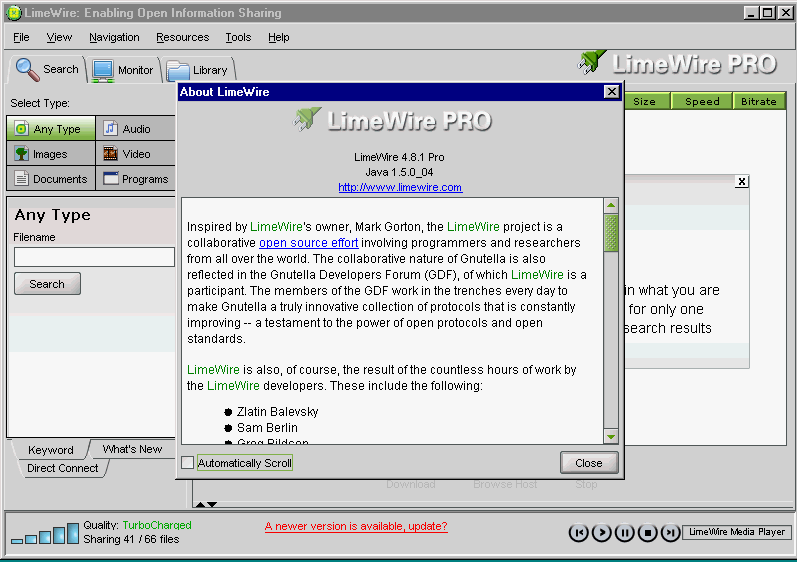
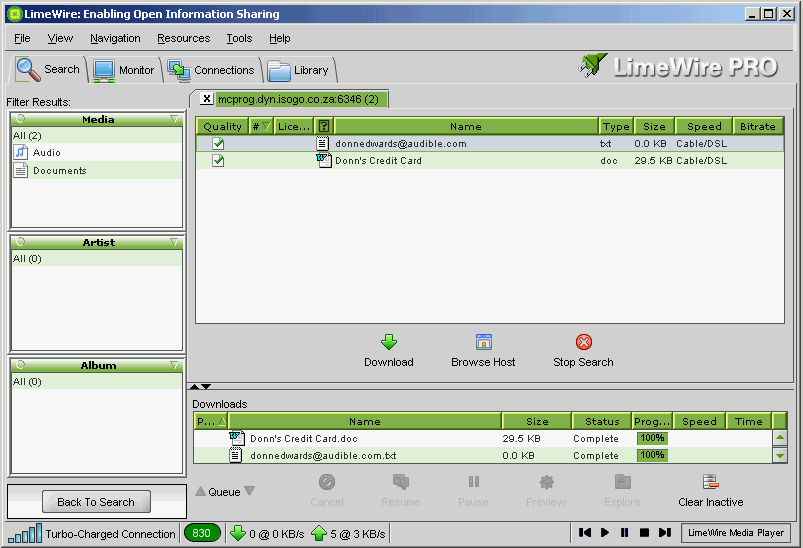
Update: I installed an old version (4.8.1) of LimeWire on a test machine (image below). It looks remarkably similar to the "proof" screen that Ed keeps rambling on about (top image). Notice how the bottom left corner of the application displays the connection type and number of files shared in the 4.8 format. Now compare it to the same display in the 4.9 format (above). So once again, Ed, you've been caught out ("Every time I use Limewire I download it from the site (free version) and when I'm finished using it I uninstall it along with all its registry changes. A small price to pay for the safety of my machine." Funny, the screen shot you sent was of an old, paid version.
"I actually went into the studio with a clean machine and downloaded the free version that was on their site. As current as it gets." Not according to the video image, which showed the paid version.)

(Click on the image for more detail)

Ed challenged me: "Go ahead, put your money where your mouth is. Give me your IP, let me look around for your contacts, or take a quick glance of your tax records. Or do you still want to hide behind your spamcops.com [sic]? Oooohhhhhhh, lets be real, give me your IP and 5 minutes I'll make your machine two step like we do it here in TX." So let's be real, Ed: you failed to do anything to my machine. You failed to prove that you even connected to my machine. I guess you have some explaining to do to Dan Ronan and WFAA TV.

Related entries: Abort, Retry, Fail | Go Ahead, Hack My LimeWire

LimeWire Security Hole Exposed and Remedied

Slyck News story dated March 14, 2005:

On the LimeWire.com homepage a curious message has recently appeared. On the upper left portion of the homepage, the text 'Security Update!! All LimeWire users of versions prior to 4.8 must upgrade' was posted. The lack of information, while potentially confusing to some, is method of self-protection when a serious exploit is discovered.
However, since a more mainstream audience has adopted LimeWire, the next move has been to release additional information to reach its extensive user base. LimeWire has also communicated the situation by sending upgrade messages to users of older versions. Slyck spoke with LimeWire COO Greg Bildson about the security flaw.
'LimeWire versions prior to our 4.8 release of two weeks ago contained a serious potential security flaw. Since April of 2004, it was possible to craft a HTTP request for an arbitrary file off the computer of an active user. The problem actually arose in two forms. Version 4.6 fixed half of the problem but it was only in version 4.8 that we fixed both problems. These flaws were pointed out to us by Cornell researchers reading through the open source code themselves.'
"We quickly created patches and addressed the problems immediately upon discovery. We have been shipping version 4.8 for two weeks but we strongly encourage all users to upgrade. If users have not yet upgraded to version 4.8, please do so."
"Let me outline the two specific problems. There was a bug introduced in LimeWire in April 2004 which could allow access to an arbitrary file off a user's hard disk. Based on this bug, a HTTP request could be crafted for a file on the same hard drive that LimeWire was installed on. Our 4.8 release on Feb 28 fixed this problem."
"A similar but slightly more invasive problem was introduced in July of 2004 as part of a new feature. Based on a flaw in the design of this code, a HTTP request could be crafted for a file across hard drives on a user's computer when actively running LimeWire. This problem was fixed in version 4.6 of LimeWire."
"Again, we strongly encourage all users to upgrade to LimeWire version 4.8.1 available now if they have not already done so."

Original Slyck News story

Saturday, December 03, 2005

Abort, Retry, Fail

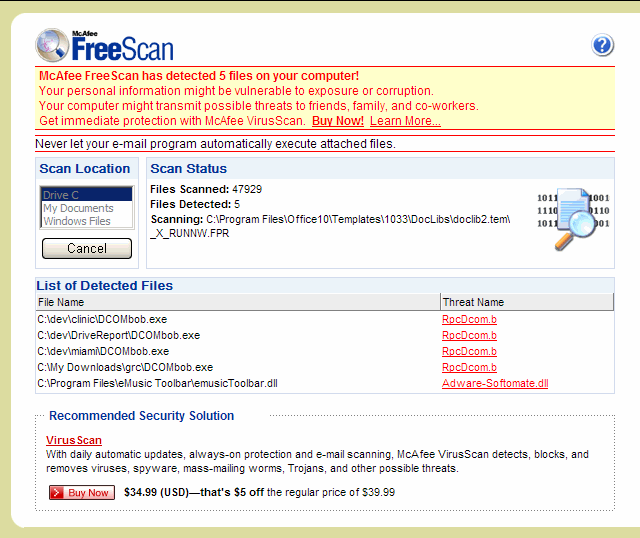
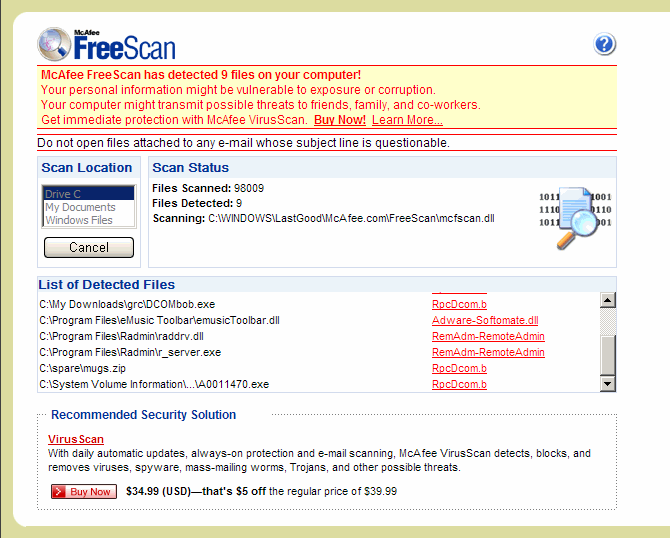
I have to admit the guy has a nerve. He claims to have infected my PC with viruses, and suggested I run a McAfee scan. So here is the scan result: 12 detected files.


(Click on the images for more detail)

Why am I not worried? Well, for starters, McAfee reports the GRC.com application DCOMbobulator, along with the Remote Administrator program from Famatech, and the eMusic toolbar. If you read the detailed notes more carefully, they mention that none of these files is a virus, but a potential security risk. Funny they don't detect LimeWire as a security risk. Ed obviously knows better. Here is what he claims:

(Click on the image for more detail)

I'm not convinced. I tried really hard to find the files shown here, without success. They certainly aren't on my PC. And the claimed "infections" didn't show up, either with my anti-virus program, or with Ed's faithful McAfee. And Rootkit Revealer 1.56 doesn't report anything either.

Ed insists that mcprog.dyn.isogo.co.za isn't my PC's IP address, and refers to it by the IP number 165.165.150.158 (also known as dsl-165-150-158.telkomadsl.co.za). Actually, that number is part of a pool of addresses used by my ISP, and gets changed every 24 hours or so. The dynamic address from Isogo keeps track of which number in the pool is for my internet connection.

The screen shot he sent reveals a few unintended things too: Ed claims to use only the very latest free version of LimeWire. Why then does the screen shot display an out of date version of LimeWire PRO? It even warns him that it's out of date, right on the screen! DUH. LimeWire PRO isn't the free version, but the paid version.

Try again Ed. I'm waiting for you to hack my machine. And spoofing my IP address doesn't fool me, even if it fools your clients. I know what the "disconnected" icon means. ;-)

Friday, December 02, 2005

Go Ahead, Hack My LimeWire

I don't normally run LimeWire all the time, because I can't spare the bandwidth, and 3GB a month is not a huge amount if you're sharing a whole bunch of files, so I rarely share any. But this weekend is different: Edward L. Chiarini Jr. has promised me that he'll use the "security flaw" in LimeWire to hack my PC.

You can try it too: use a direct LimeWire connection to mcprog.dyn.isogo.co.za on the standard Gnutella port of 6346. It's wide open, even GRC.com says so. This is what you should find:
(Click on the image for more detail)

But what else will you find? My guess is nothing, because there isn't anything else to see, just the way LimeWire installs things. I don't for one moment deny that stupid people share all their files, but then stupid people do all kinds of other stupid things too. But that isn't a security flaw in LimeWire, isn't it?

Of course, if you really keep looking, you might find part of my credit card number, but only if you look really hard.

Update: in spite of the incoherent ramblings in the comments section, Ed didn't hack my PC. He was unable to say what files were shared on my PC, and the image he provided didn't show them either. Here is his image:


Here is what I was sharing, as seen from another PC:

So if he had connected to my PC, these files would also show up in his picture. Not even the word document showed up, and he knew in advance about that.

See follow-up blog: Abort, Retry, Fail | digg story
| Original News Story | WFAA News Story: Flaws Exposed
| File Not Found; Flaw not Found