Wednesday, March 15, 2006

Microsoft Says “Open Office is Just Fine”

When you decode all the spin in the article, this is what you get:
“It really depends upon what job you’re trying to do. Certainly, if you’re just trying to write a few notes or something, Open Office is just fine. The truth is though that Open Office.org is really designed to solve the problems that Microsoft focused on 10 years ago when the model was an individual user working at their individual PC,” says Alan Yates (General Manager, Information Worker Group at Microsoft - see photo).
“The world and Microsoft software has grown way beyond that to make it very easy to do what used to be very hard things. Most documents today are not done by one individual. They’re done by multiple people working on a project at once. Essentially, Open Office is fine if you have very limited needs because it was really designed around what Microsoft Office products were designed around 10 years ago.” That's spin for saying that the only people who are getting any value out of new versions of Microsoft Office are large corporate environments that have the technical resources and money to deploy all their "cool server features".
Now that Microsoft has taken my money (and spent it) for products I bought from them in the last 10 years, it's very nice of them to tell me that they won't support my product and more and I should upgrade to get more bloatware that I don't need in the vain hope that the parts that I do need have been made more reliable. I don't think so.
The only reason I don't use Open Office is because they don't have a decent database program, like Microsoft Access97. And the reason I haven't upgraded to a newer version of Office is that there are no amazingly new, stunningly wonderful features in Office 2000, 2002 or 2003 that justify the cost. And I was stung by the numerous bugs in the Access 2000 Runtime that forced me to go back to Access97 so the data wouldn't get corrupted. Also, Access 2003 doesn't run on Windows 98, which halves my client base.

Read all the Microsoft spin at Microsoft says Open Office.org 10 years behind

Tuesday, March 14, 2006

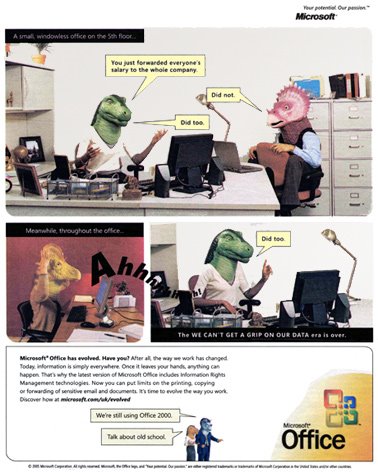
The Microsoft Dinosaur

Why insulting your customers is not a good way to get them to buy your products

Every time I see those damn Microsoft Office dinosaur ads my blood boils. I paid a lot of money for my new copies of Office97 Professional and Developer's Edition, as well as Office XP Developers Edition. They both work fine on the machines I installed them on. The advertised ones don't work; none of my customers have them either, mainly because their hardware still runs Windows 98SE.
Microsoft was delighted to sell me these products when they were released. Now they want to insult me by saying that they sold me a dinosaur. What a bunch of arrogant, manipulative money grabbers! When did they forget that "the customer is always right"?
I don't recall seeing a "sell by" date on the package. Yet every time I get a fatal error on Access97 I get the wonderful error screen shown below. Perhaps they should put that in their advertising.
Their new ads are just a reworking of the same old tired "latest and greatest" theme that they have been cranking out for years. Frankly, I'm sick of it. It's a pain in the neck installing patches for products; but it's even more painful when obvious problems are no longer patched. Support is part of the deal, and as long as customers are using the product, it should be supported. Not everyone can or wants to upgrade. Please don't insult the ones who don't upgrade and expect them to remain loyal customers.

And don't insult your customers by implying that they hit the wrong button. They didn't decide on the default placement of the buttons, did they?

Programming for Power Failures

Programming in South Africa has had to adjust to a whole new set of ground rules. Not only does the broadband connection disconnect itself every 6 hours, thanks to Telkom, but the power can go out at any moment. This makes for interesting database programming.
I am writing a database program for Men's Clinic that helps them process patient bookings and invoices at the clinic level. To tighten up security we only allowed invoices to be made out for today's date. That's all very well if the power is working, but what do you do if the power went off and you went manual for the rest of the day? How do you allow the clinic people to catch up the invoices on the following day, without preventing them from issuing invoices for today as well? An interesting problem. After all Uninterruptible Power Supplies don't last forever. And petrol generators are fine, provided you can buy petrol. Personally, I'd prefer a diesel generator, because you can run it on cooking oil if diesel isn't available.


Click on the pictures to see the brilliant Madam and Eve cartoons

Cheney and Zuma


South Africa win the greatest match of all

Never mind 426 runs in a day (semi-final of the 1999 World Cup), Australia had just posted a world-record 434 for 4 in a single innings - the first 400-plus total in the history of the game - with Ricky Ponting leading the line with an innings of cultured slogging that realised 164 runs of the highest class from just 105 balls. And yet they still lost - by one wicket, with one ball to spare, and with the Wanderers stadium reverting to the sort of Bullring atmosphere on which it forged its intimidating reputation

Cricinfo - South Africa win the greatest match of all

The End of my AppleScript Lines

Several years ago I worked for Independent Newspapers in Johannesburg. One of my most challenging and successful projects involved placing ads on the editorial pages, and drawing the lines around the ad boxes.
On Friday I was chatting to Mahomed Doola at The Star and discovered to my delight (and horror) that my program is no longer being used, and their entire editorial process in being upgraded and replaced by some really exciting technology.
I was the "resident propellor-head" in the IT Department at the time, and we were using QuarkXPress for page layouts. Every day a dozen or so highly paid sub-editors would waste several hours of their time drawing empty boxes on their pages where the ads should go, and then spending even more time drawing visible lines ("rules") around these boxes to separate the ads from the editorial copy. It was a mindless and boring task, and if it was done in too much of a hurry it made the pages look dreadful.
On top of that, the people in the advertising department who decided where the ads were to go would have to do a long manual task of drawing and labeling the ad boxes on page dummies, and then send a photocopy of the dummy to the sub-editors to draw the ad boxes on their pages.
We solved the ad placement problem with a nifty but expensive program (PlanLinker) from PCS in the UK. It allowed the advertising department to create the boxes directly from the list of ads and their sizes, and this page information was then "checked in" to the editorial system in a way that allowed the editorial people to see the shapes of the ads, and eventually include the ads on the pages, without them doing a whole lot of extra work.
Part of this "checking in" process was automated by means of some AppleScript programs, and it included the program for drawing the lines around the boxes.
The Algorithm
It was so simple once I got it, but it took several days of drawing lines and boxes to figure out what was required. After all, the ad boxes could be stacked on top of one another, or next to one another, or both. As long as they were generally to the bottom and the outside part of the editorial pages, there wasn't much else to go on. The task was to find a way of drawing a line between the "staircase" of ads and the editorial copy. And then there were lines to be drawn between the ads as well.
After a while it dawned on me that irrespective of how complicated the layout of the ads was, there was always a line to be drawn above the ad, unless the ad hit the top of the page. Also, the horizontal line always had to extend out beyond the top of the ad. This distance was always the same: half the gutter width. If the ad was on the outside of the page, then the line didn't need to extend at all, since there was no gutter margin on the outside, only between columns.
So now I had a line above every ad. I soon realized that if there were two ads next to one another of the same height, the lines would touch, giving the appearance of a solid line. Also, I now had horizontal lines between all the ads as well, because the line above an ad at the bottom of the page would work as the line between it and the ad above it.
Using the same logic I could draw a vertical line on the inside of every ad. If the page was a left hand page, i.e. with an even number, this line would be on the right of the ad, and for odd numbered pages on the left. The lines were left out if they extended beyond the page margins.
If I kept the vertical gap between ads the same size as the gutter width, then all the lines would be half that distance away from the ad itself, leaving a nice clean geometry around the ad.
It took a while to learn how to do all of this using AppleScript, and I got ideas and code from a number of very helpful people on the AppleScript email list. It was a wonderful learning experience.
The AppleScript program was in use for around 10 years, which is a long time for a utility like that. It was fun while it lasted.

Monday, March 13, 2006

Tshwane Shows the Broadband Way

Tshwane (formerly Pretoria) is widely considered the leader when it comes to municipal telecoms, and when one looks at their infrastructure and projects it is not difficult to see why.
This municipality has developed an extensive fiber infrastructure and is now starting to build telecoms services on this foundation.
One of the most exciting developments is the Rooiwal Broadband Village project where all the houses in this town have been furnished with a 4 Mbps broadband connection. These connections are 4 times faster than Telkom’s fastest DSL offering, and make use of Broadband over Power Line (BPL) technology.
The traffic is carried over 28 km of Tshwane’s fiber network while the last mile connectivity is provided through the existing power cabling. The full BPL network has a theoretical capacity of up to 200 Mbps.
Charles Kuun, Manager of the Tshwane Digital Hub, says that the project is a great success. He pointed out that users utilize these fast broadband connections for anything from research to entertainment.
This project has proven to be so successful that Tshwane is now preparing for commercial launch in the East of Pretoria. Specifics surrounding this project are not public knowledge yet, but if Rooiwal is anything to go by residents of this city is sure to benefit from the innovation by Kuun and others.
The Tshwane Metropolitan Area Network (MAN) is however not only sticking to fixed networks, and based its developments on wireline, wireless and powerline (PLC, BPL) communications.
Tshwane aims to establish integrated broadband networks creating an effective broadband cloud over the city. They further plan to provide free Internet points and would like every citizen to have an email address and a means to access their mail.
This may seem like a very ambitious aim, but Tshwane is working with various interested parties to ensure its success. With their extensive fiber network and the innovative use of existing technologies it is not far fetched at all.
Many other cities in South Africa are moving in the same direction, and these municipal developments are one avenue which may just prove to be the solution to South Africa’s broadband dilemma.

The wonderful irony is that Telkom's head offices are in Tswane, so it is great to see this happening right under their noses! Also, my former high school is in Tswane, so I'm doubly proud.

MyADSL News

Google Gives Out Gmail Addresses for Free

A simple site command search at Google can give you a list of, currently, 21,000+ gmail addresses to add to your mailing list. The number will just grow as people add googlepages.com sites.
The problem is that google uses the part of your gmail address (before the @ sign) as the subdomain on the googlepages.com site, so fred@gmail.com gets a page called fred.googlepages.com.
This simple search allows you to get a list of all the googlepages.com sites, and a simple search and replace gives you all the gmail addresses belonging to those sites. DUH

read more | digg story